Business Central State Field

Business Central State Field

This blog talks about the issues that you face while using Business Central State fields as it does not restrict from entering any state.

Business Central State Field

Introduction- Business Central State Field

When using Business Central for creating customers and vendors fields, certain issue might arise which may include the system not restricting from entering any state. For some countries like US the Tax collection happens state wise so allowing the system user to manually enter any value will cause a problem in your month end reporting system.

Look below at the issue being reported by the client on the base functionality. Read further to know about the solution.

Here is the list of business central state field being added by the customer which caused the issue in: Sales Tax Reporting State wise.

Calendar Description automatically generated with low confidence

  • The state field can be updated to any value and it is not part of the master table.
  • So the user can pretty much get away with entering any values as you see below. 
  • You can enter test, even though it does not appear in the ZipCode pop up.

Table Description automatically generated with medium confidence

These Business Central State Fields can be a problem area for different records here:

  1. Customer card
  2. Vendor card
  3. Sales Order, Sales invoice , Credit memo
  4. Purchase order, Credit memo and Purchase invoice

To fix this issue as a workaround, we created a manual upload via configuration package.

For the posted Sales Invoice, you cannot change anything that has been done already. (We can do it from the backend though, but it would be a separate topic of discussion).

Check the Sales Invoice header table which is the table for storing all posted Sales Invoice.

  • Run a configuration package for sales order table which is Table no.36 and allow the user to upload the correct data for the state and then apply the package for it.

The limitation of this process is that it could only be applied to sales order header table and not to the posted sales invoice table, if the user has already posted it with an incorrect state value.

Conclusion- Business Central State Field

Always ensure the user is aware that state field cannot have random value and they should be creating a order with the right data and reviewing it before posting the transaction. This is more of a user training issue as this is how the standard system works.

We also added the ship to field in the list column as well so its easier to take the excel output from Business Central as seen below.

Currently, this shows for posted Sales Invoice but the same can be done for Sales Order and other screens too.

Graphical user interface Description automatically generated

Proud Blogs that
make us stand
out

SAP Fieldglass Resume Ranking setup Recent Home

S/4 Hana

SAP Fieldglass Resume Ranking setup

Ensure seamless SAP Integration | Secure Access | Auth0 with third-party APIs. Secure authentication &…

Choosing the Right O365 Subscription: Monthly, Annual & Hybrid Commitments Recent Home

sub -O365

Choosing the Right O365 Subscription: Monthly, Annual & Hybrid Commitments

This article explores the various Microsoft 365 subscription models—monthly, annual, and hybrid—and helps you choose…

Peritos Wins Globalisation Excellence Award | MSME Star Stories 2024 Recent Home

Awards

Peritos Wins Globalisation Excellence Award | MSME Star Stories 2024

Peritos Solutions is proud to be a winner in the “Globalisation Excellence” category at MSME…

Peritos Wins at NABH Quality Connect Fiesta 2024 Recent Home

Awards

Peritos Wins at NABH Quality Connect Fiesta 2024

Peritos proudly receives the NABH Quality Connect Healthcare Quality Pitch Award at the 2024 Competitions…

Peritos: New Zealand ICT Award Finalist for Technical Award 2025 Recent Home

Awards

Peritos: New Zealand ICT Award Finalist for Technical Award 2025

Peritos Solutions has been named a finalist for the 2025 New Zealand ICT Technical Award,…

Thinking about a project? Get in touch with us.

Connect with Us Today through the Details Below or Fill
Out the Form for a Prompt Response

Book Free Consultation

Guaranteed response within 8 business hours.


    Trusted by Startups and Fortune 500 companies

    07+ years of experience

    We can handle projects of all complexities.

    100+ satisfied customers

    Startups to Fortune 500, we have worked with all.

    20+ in-house team

    Top 1% industry talent to ensure your digital success.

    Business Central State Field Customizations

    Business Central State Field Customizations

    This blog talks about Business Central State field customizations via the lookup table. It offers a solution to restrict the users.

    Business Central State Field Customizations

    Introduction

    In this blog, we will talk about Business Central State Field Customizations. As mentioned in the last article, we are trying to control the value in the state field so that more validations can run on them..

    We have created a lookup table which is updated based on the specific country in the configuration. The user can select the state based on a lookup table.

    There are some more checks and balances we could add. For example:

    1. Allow only specific users to update states.
    2. Admin user should only be able to edit the state values in the vlookup table.
    3. Restrict editing state field on the UI and user should only be selecting the state from the lookup table. We can also make state field mandatory for specific countries, if needed.

    We created custom roles and permissions and assigned the user profiles; whoever has the right role will be able to update the State lookup table.

    Here, we update the value of the table from which state lookup table is valid. We specified the country as US, so the checks will run only for the US.

    Here is a screenshot of- How I am able to add any state in the sales order field before my change.

    Table Description automatically generated with medium confidence

    And now, after my change this is how the sales order screen looks like:

    1. State field, Country is disabled
    2. It can be selected when clicking on the pop up of Zipcode.

    To see the available option of state field click on the 3 dots.

    Graphical user interface, chart Description automatically generated

    Now the user would see the 3 dots to open the table for State

    Graphical user interface, application Description automatically generated

    Conclusion- Business Central State Field Customizations

    With this change we are now able to restrict user to only select the state values from the available options. This would then prevent the user from randomly entering an incorrect value. Hence, giving lesser issues when trying to collate the data state wise for reporting, taxation or compliance purposes.

    For more information:https://learn.microsoft.com/en-us/dynamics365/business-central/ui-customizing-overview

    Proud Blogs that
    make us stand
    out

    SAP Fieldglass Resume Ranking setup Recent Home

    S/4 Hana

    SAP Fieldglass Resume Ranking setup

    Ensure seamless SAP Integration | Secure Access | Auth0 with third-party APIs. Secure authentication &…

    Choosing the Right O365 Subscription: Monthly, Annual & Hybrid Commitments Recent Home

    sub -O365

    Choosing the Right O365 Subscription: Monthly, Annual & Hybrid Commitments

    This article explores the various Microsoft 365 subscription models—monthly, annual, and hybrid—and helps you choose…

    Peritos Wins Globalisation Excellence Award | MSME Star Stories 2024 Recent Home

    Awards

    Peritos Wins Globalisation Excellence Award | MSME Star Stories 2024

    Peritos Solutions is proud to be a winner in the “Globalisation Excellence” category at MSME…

    Peritos Wins at NABH Quality Connect Fiesta 2024 Recent Home

    Awards

    Peritos Wins at NABH Quality Connect Fiesta 2024

    Peritos proudly receives the NABH Quality Connect Healthcare Quality Pitch Award at the 2024 Competitions…

    Peritos: New Zealand ICT Award Finalist for Technical Award 2025 Recent Home

    Awards

    Peritos: New Zealand ICT Award Finalist for Technical Award 2025

    Peritos Solutions has been named a finalist for the 2025 New Zealand ICT Technical Award,…

    Thinking about a project? Get in touch with us.

    Connect with Us Today through the Details Below or Fill
    Out the Form for a Prompt Response

    Book Free Consultation

    Guaranteed response within 8 business hours.


      Trusted by Startups and Fortune 500 companies

      07+ years of experience

      We can handle projects of all complexities.

      100+ satisfied customers

      Startups to Fortune 500, we have worked with all.

      20+ in-house team

      Top 1% industry talent to ensure your digital success.

      Business Central Web Service APIs

      Business Central Web Service APIs

      This blog talks about Business Central Web Service APIs and its easy availability to various external systems and users.

      Business Central Web Service APIs

      Introduction- Business Central Web Service APIs

      Business Central supports multiple web services like API, SOAP, and OData. These are extremely lightweight and easy to use. Because of these services, industry-standard application functionality is available to various external systems and users. We have used these web services to create custom report for clients, handle data in excel or use data in a reporting tool like Power BI.

      When Business Central objects are published as web services, they’re immediately available on the network.

      In this blog, we will be covering the following topics

      • Understand the existing web services and their use in excel
      • Create any new web service if not available on the list

      Finding the right Business Central Web Service APIs

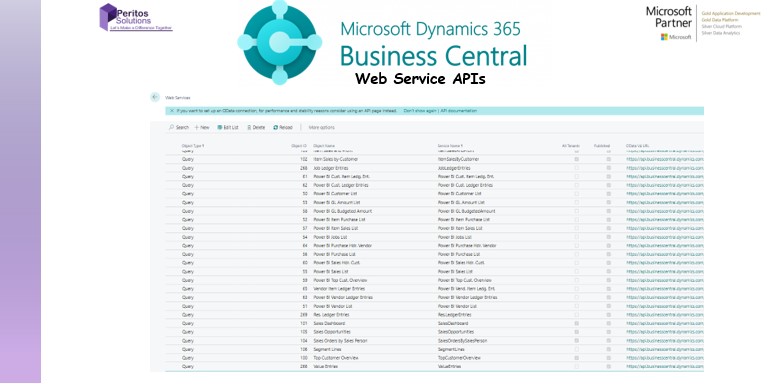
      In order to use the web services, navigate to the list of web services available in the system.

      Now copy paste the URL as it will include all the details including the company name and allow you to read data from the Business Central System. Note that the web service will be company specific.

      In this case, I need to extract the Purchase order line items. So here is the highlighted odata URL for page 54 API.

      Graphical user interface, text, application Description automatically generated
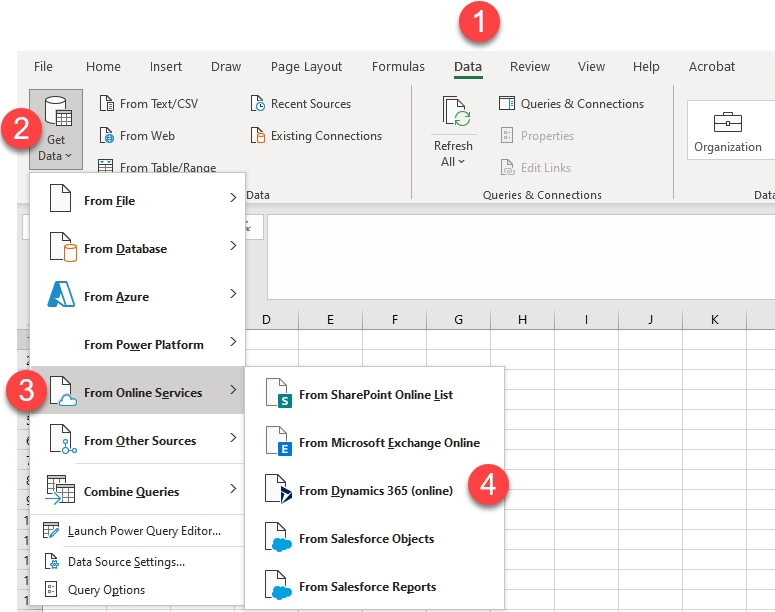
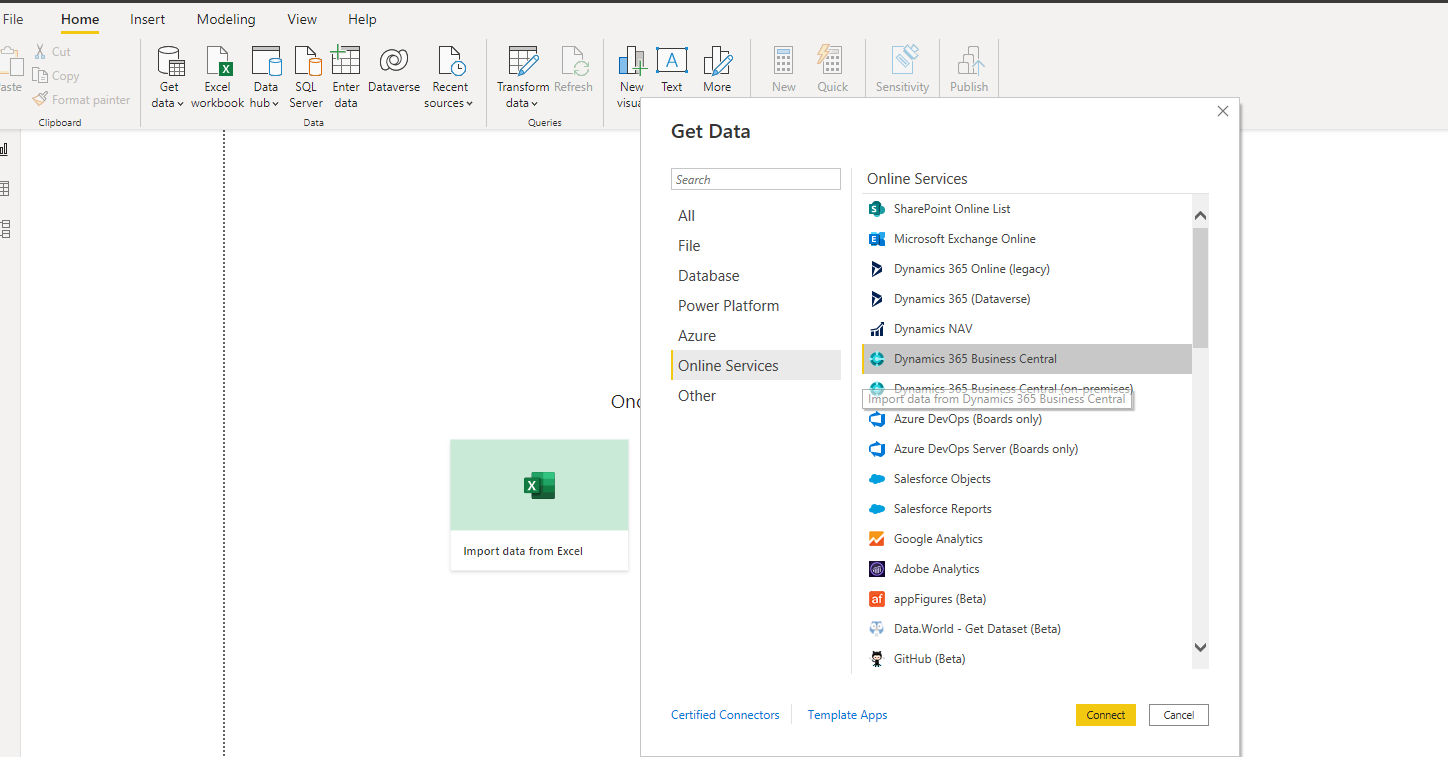
      • Open excel > Go to Data > Get Data > Online Services > Dynamics 365 online
      • Or, Data > Other Sources > OData Feed
      Graphical user interface, application, table Description automatically generated
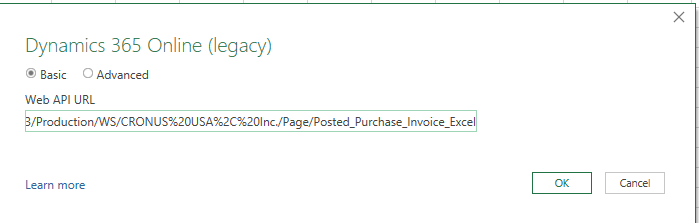
      Update the API link in the pop up which opens up as below
      Graphical user interface, application Description automatically generated

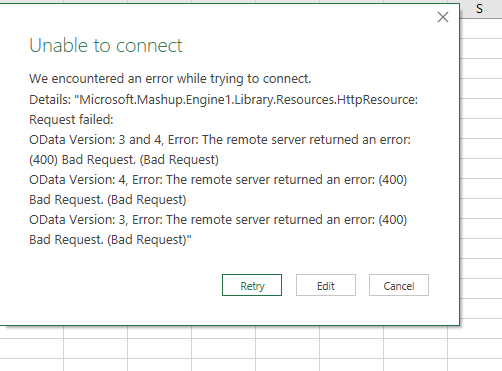
      It might give you an error as below:

      “OData Version: 3 and 4, Error: The remote server returned an error: (400) Bad Request. (Bad Request)”

      Graphical user interface, table Description automatically generated

      Sometimes, the API either has an issue or it is not published or is not the right API to use. So look for another one.

      I found another API page 138 API as below where I am able to get the data loaded after I pasted the API and pressed on “Ok”.

      Now, do the same thing in calling these APIs via Power BI Report. To create power BI Report call the Odata service,

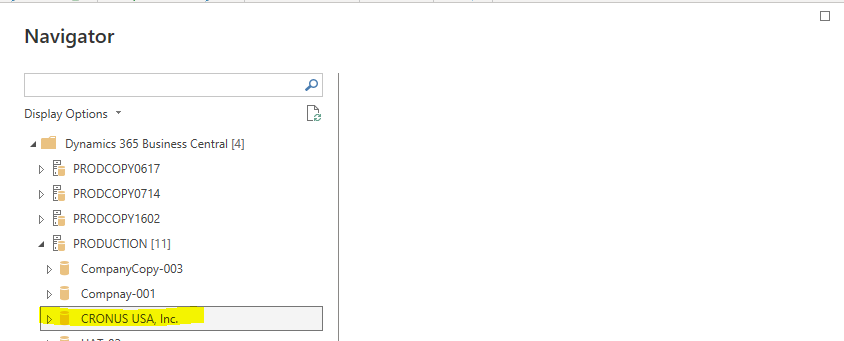
      It would list down all the companies.

      Graphical user interface, application, Word Description automatically generated
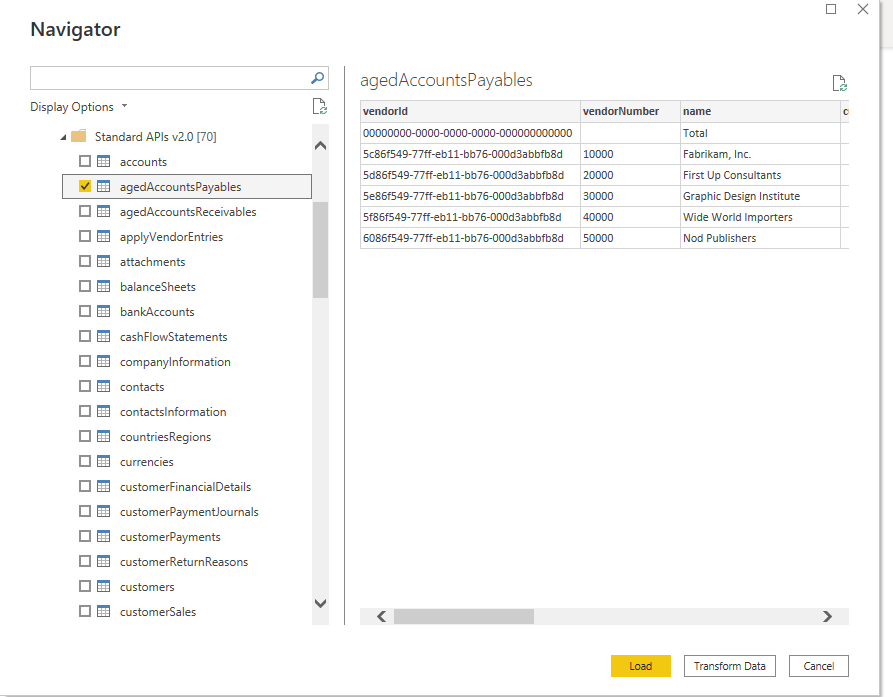
      Select from the standard set of APis the data needed and click on data to start building the report
      Graphical user interface, text Description automatically generated
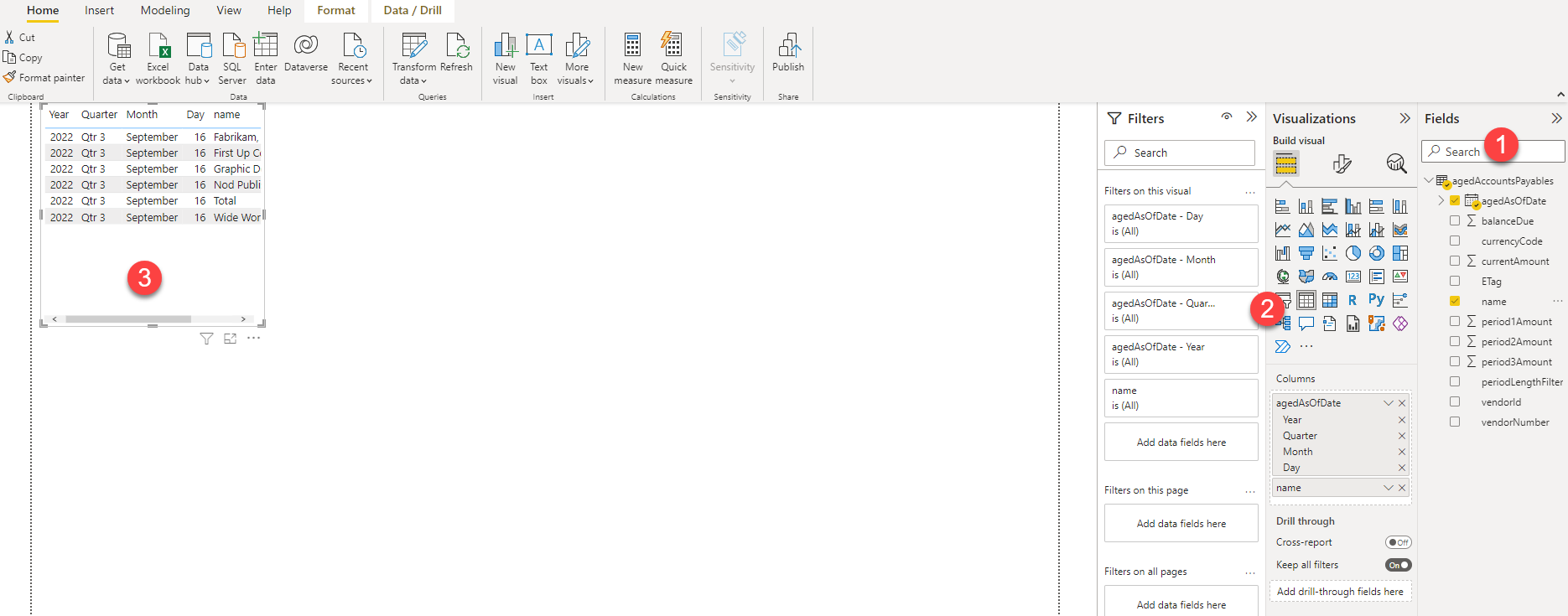
      Select the right table visual and see the data on the dashboard page.
      Graphical user interface, application, Word Description automatically generated

      Conclusion- Business Central Web Service APIs

      It is always useful to be able to create custom reports for the client even though there are a lot of standard reports available, and I find this feature very handy as I don’t have to keep downloading excel to do my comparison as I connect via APIs and just refresh the data for any new changes.

      Business Central comes with an extensive list of built-in APIs that requires no code and minimal setup to use. When using the built-in APIs, please choose the highest API version available. 

      You can also develop your own custom APIs using the AL object types API pages and API queries.

      Proud Blogs that
      make us stand
      out

      SAP Fieldglass Resume Ranking setup Recent Home

      S/4 Hana

      SAP Fieldglass Resume Ranking setup

      Ensure seamless SAP Integration | Secure Access | Auth0 with third-party APIs. Secure authentication &…

      Choosing the Right O365 Subscription: Monthly, Annual & Hybrid Commitments Recent Home

      sub -O365

      Choosing the Right O365 Subscription: Monthly, Annual & Hybrid Commitments

      This article explores the various Microsoft 365 subscription models—monthly, annual, and hybrid—and helps you choose…

      Peritos Wins Globalisation Excellence Award | MSME Star Stories 2024 Recent Home

      Awards

      Peritos Wins Globalisation Excellence Award | MSME Star Stories 2024

      Peritos Solutions is proud to be a winner in the “Globalisation Excellence” category at MSME…

      Peritos Wins at NABH Quality Connect Fiesta 2024 Recent Home

      Awards

      Peritos Wins at NABH Quality Connect Fiesta 2024

      Peritos proudly receives the NABH Quality Connect Healthcare Quality Pitch Award at the 2024 Competitions…

      Peritos: New Zealand ICT Award Finalist for Technical Award 2025 Recent Home

      Awards

      Peritos: New Zealand ICT Award Finalist for Technical Award 2025

      Peritos Solutions has been named a finalist for the 2025 New Zealand ICT Technical Award,…

      Thinking about a project? Get in touch with us.

      Connect with Us Today through the Details Below or Fill
      Out the Form for a Prompt Response

      Book Free Consultation

      Guaranteed response within 8 business hours.


        Trusted by Startups and Fortune 500 companies

        07+ years of experience

        We can handle projects of all complexities.

        100+ satisfied customers

        Startups to Fortune 500, we have worked with all.

        20+ in-house team

        Top 1% industry talent to ensure your digital success.

        Business Central- Top 8 Unique Features

        Business Central- Top 8 Unique Features

        This blog talks about Business Central Top 8 Unique Features and why migrating to this ERP system is a good idea.

        Top 8 Unique Features of Business Central

        Introduction-Business Central Top 8 Unique Features

        Business Central is a business management solution for small and mid-sized organizations that automates and streamlines business processes and helps you manage your business. In this blog, we discuss how Business Central and some of its unique features can encourage you to migrate to Microsoft for a new and easy way of business. With Business Central, you can streamline business processes and use its inbuilt features to help you manage your ERP system effectively.

        Business Central- Top 8 Unique Features

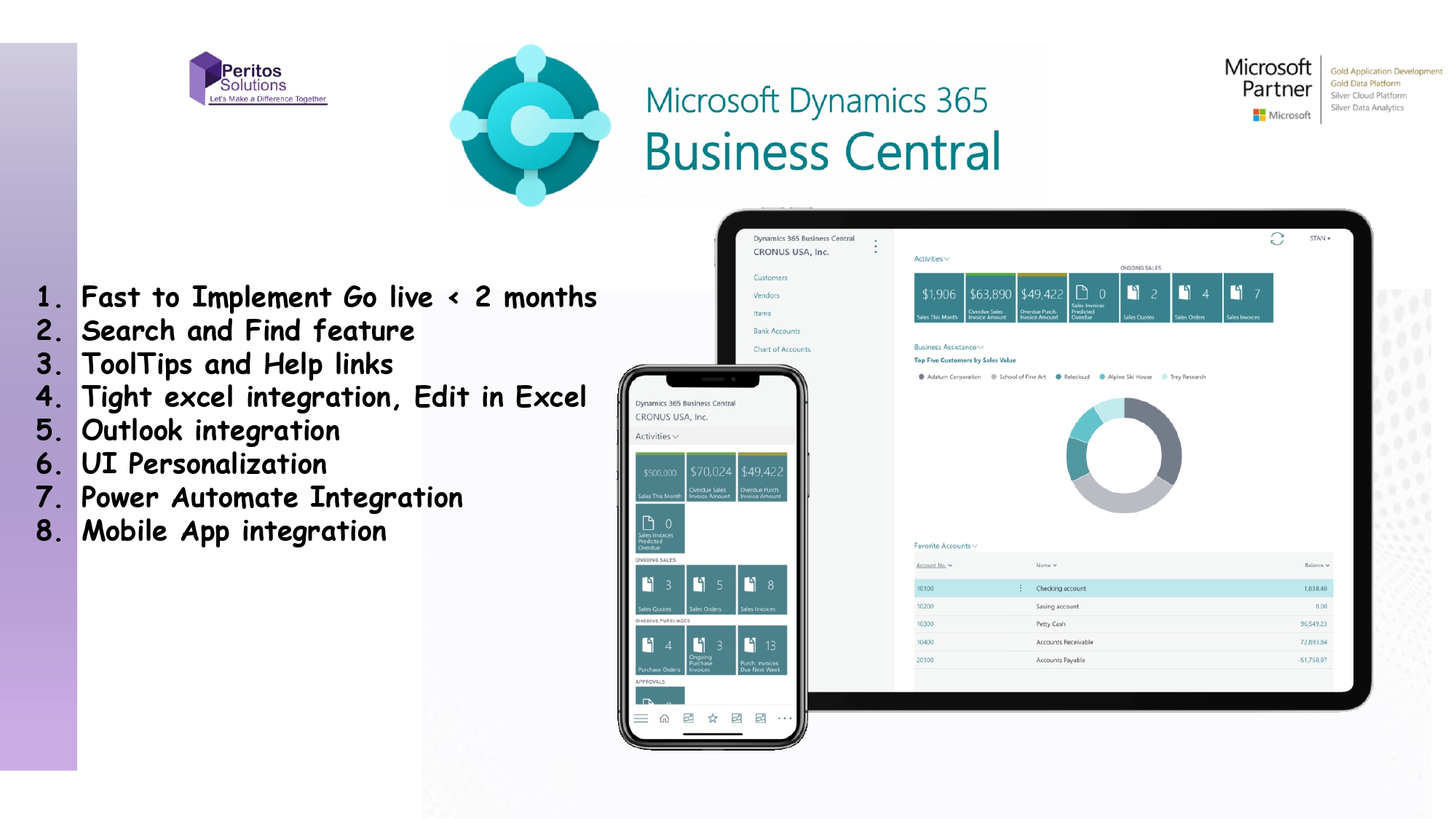
        Let’s have a look at some of the features that are only available in Business Central: 1. Fast to implement: Based on our past experiences, clients can migrate to Business Central within just 8-12 weeks. The weeks differ depending on the number of modules you want to implement and the amount of business processes you want to customize. Download our checklist which would help you to understand the same in a better way.   2. If you do not find what you are looking for just search (Type the name and the options appears) along with a strong documentation links associated with each search option. For example, if you want to receive customer payment, you will have to search for it.

        • Type in the search box
        • Enter the text to search
        • Get the link to the relevant page
        • Get some documentation and help links associated with it
        • Get some partner app source links to match your search criteria

        Business Central Features   3. Each field includes tooltips and a link to follow so you are never really lost. For example, I wanted to know about the Register Customer Payment and what does the field Payment Made do, so it diverted me to the help documentation page when I clicked on “Learn More”.   Excel based ERP System   4. Everything is excel based, but it does not mean that you have to do all the tasks in excel. However, everyone knows that no matter how robust your ERP system is, you still always download the data on an excel for further analysis.    Here, you have multiple options:

        • Download data in excel by selecting all records and click on Edit in excel option.

          Business Central- Top 8 Unique Features  

        • Upload masters and other data via excel as seen on the right. Then, a panel box opens up which lets you enter your User ID and Password.

          Edit all the Business Central data in Excel  

        • Edit in excel and upload directly just via clicking on refresh , publish, filter and design

          Upload your edited data from excel in Business Central  

        • Copy and paste from excel onto the system like you would add to another excel file. On the screen, select the line item and Ctrl + C to copy and paste to excel, or copy it over from excel, depending if the page accepts new entries or not.

          5. Integration with outlook is beyond amazing as it offers some salient features.

        • If the same customer replies back to you, it is easy to get customer insights
        • Create sales quote, orders, purchase orders etc., without logging into Business Central just via the Outlook Add-on

        Check the customer insights on the right panel to see what are the ongoing Quotes/ Sales Order etc. with the customer. Also, if you hover on an email from a client who is not added to Business Central, you can add him/her in the system easily. Top 8 unique features of business central  

        • Create documents like sales order, invoices etc. without even leaving Outlook.

          Business Central and Outlook   6. Personalization: There are fields which are not visible on the UI, but behind sits a whole lot of customizations and features which can be added to make the screen your own or publish the same for all users of the organization.   7. Flow, previously known as Power Automate: Integration with Power automate is possible with a whole bunch of predefined templates here supported by Microsoft. These are AI and ML based integrations along with Integration of Power BI. Refer how you could find the templates on the flow site. Look at more than 3k+ scenarios per flow that pre-exists and are ready to be used.   Integrate with Power Automate

        • Just by activating the power flow on the Business Central, navigate to the corresponding transaction and open Actions > Request Approval > Power Automate >Create and see flows.

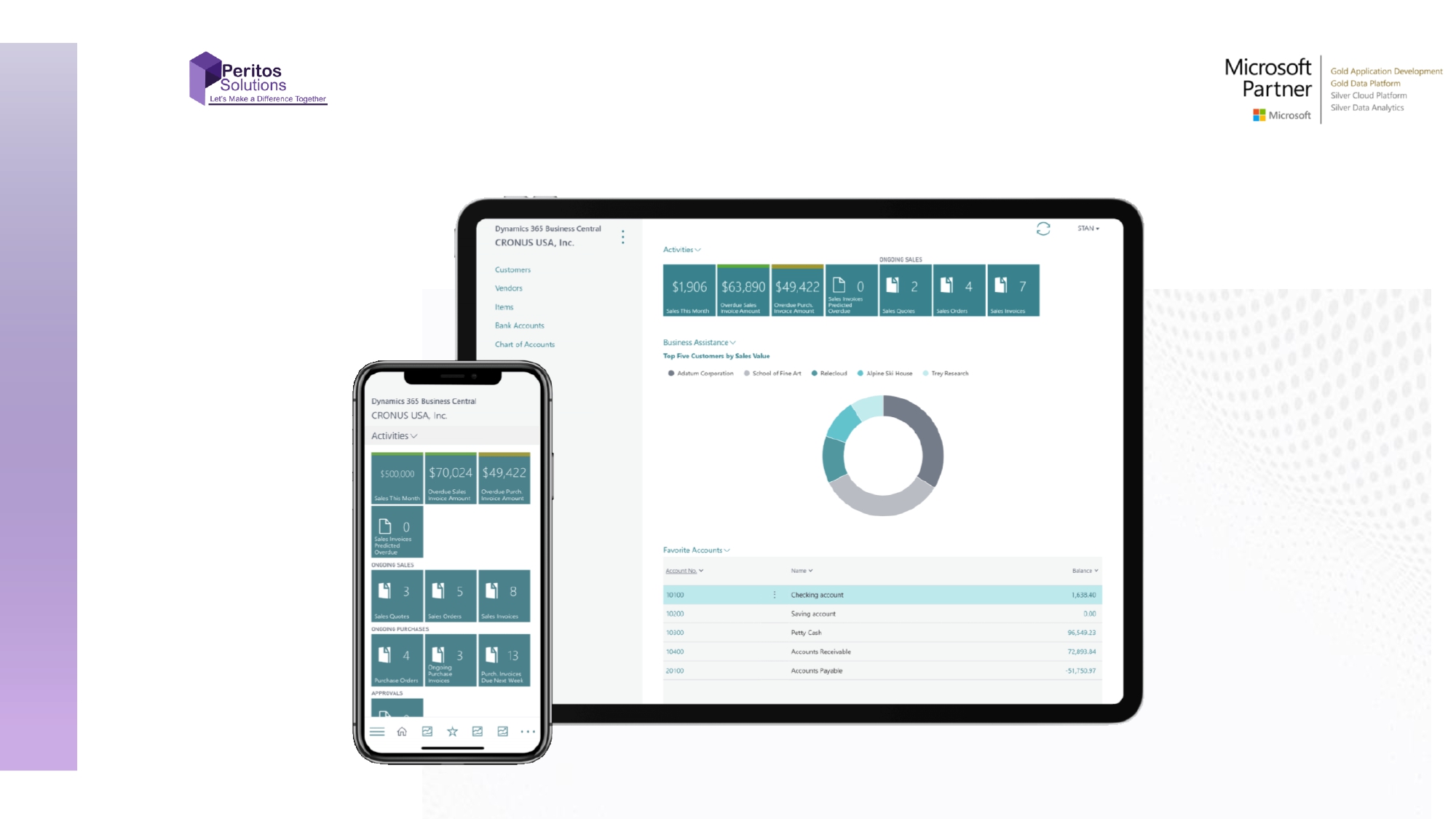
        Remember that similar kind of flows exists for other scenarios as well. Business Central Top 8 Unique Features   8. Mobile app: This is one of the features which becomes a deciding factor specifically for the busy stakeholders who want to have a quick view to approve requests. It is easy for a sales rep to show some company dashboards to the perspective client just at the click of few buttons. The below screens show how you could review the home page on the app as well as create the document page. It mimics most of the functionality that helps you manage the day-to-day transaction.   Business Central and its unique features

        Your Business Central dashboard

        Business central dashboard view

        Conclusion- Business Central Top 8 Unique Features

        If you are using Business Central cloud version, you do not have to worry about implementing the new features or upgrades from the customer or partner side as these are managed by Microsoft directly and are automatically added every time there is a release rolled out by Microsoft. Hope this helps you to understand a bit more on how Business Central works and what it offers. If you’d like to understand more, or get a free demonstration – please don’t hesitate to get in touch.

        Proud Blogs that
        make us stand
        out

        SAP Fieldglass Resume Ranking setup Recent Home

        S/4 Hana

        SAP Fieldglass Resume Ranking setup

        Ensure seamless SAP Integration | Secure Access | Auth0 with third-party APIs. Secure authentication &…

        Choosing the Right O365 Subscription: Monthly, Annual & Hybrid Commitments Recent Home

        sub -O365

        Choosing the Right O365 Subscription: Monthly, Annual & Hybrid Commitments

        This article explores the various Microsoft 365 subscription models—monthly, annual, and hybrid—and helps you choose…

        Peritos Wins Globalisation Excellence Award | MSME Star Stories 2024 Recent Home

        Awards

        Peritos Wins Globalisation Excellence Award | MSME Star Stories 2024

        Peritos Solutions is proud to be a winner in the “Globalisation Excellence” category at MSME…

        Peritos Wins at NABH Quality Connect Fiesta 2024 Recent Home

        Awards

        Peritos Wins at NABH Quality Connect Fiesta 2024

        Peritos proudly receives the NABH Quality Connect Healthcare Quality Pitch Award at the 2024 Competitions…

        Peritos: New Zealand ICT Award Finalist for Technical Award 2025 Recent Home

        Awards

        Peritos: New Zealand ICT Award Finalist for Technical Award 2025

        Peritos Solutions has been named a finalist for the 2025 New Zealand ICT Technical Award,…

        Thinking about a project? Get in touch with us.

        Connect with Us Today through the Details Below or Fill
        Out the Form for a Prompt Response

        Book Free Consultation

        Guaranteed response within 8 business hours.


          Trusted by Startups and Fortune 500 companies

          07+ years of experience

          We can handle projects of all complexities.

          100+ satisfied customers

          Startups to Fortune 500, we have worked with all.

          20+ in-house team

          Top 1% industry talent to ensure your digital success.

          Business Central Getting Started with discounted licensing and extended free trial

          Business Central Getting Started with discounted licensing and extended free trial

          This blog talks about Getting Started with Business Central and how you could be getting discounted licensing and extended free trial

          Business Central Getting Started

          Introduction: Business Central- Getting Started

          Business Central is a business management solution for small and mid-sized companies that streamlines business processes and helps you to manage it. This blog talks about some of the unique features of Business Central and highlights the advantages of migrating to it.

          If you are considering to shift to Business Central for your ERP, then we would like to congratulate you as you are taking a step ahead in the right direction. We have migrated multiple customers to Business Central because of its unique and easy to use features. 

           Let’s see how Business Central can help you manage your business and time in a better way.   This blog talks about:

          • Core modules of Business Central.
          • How to get started?
          • How to get discounted license prices from a partner?

          Core and advanced modules: Business Central Getting Started

          Business Central provides functionality for a common business processes for all types of industries mainly within wholesale and professional services. It even supports more complex processes such as assembly, manufacturing, service, and directed warehouse management.

          You can opt for their standard configuration and best practice solutions, or you could customize it to suit your needs.

          The core modules are:

          • Sales
          • Purchasing
          • Inventory
          • Finance
          • Assembly management

          These can be used in conjunction with advanced modules like:

          • Warehouse management
          • Project Management
          • Fixed assets
          • Relationship management
          • Human resources
          • Planning
          • Service management
          • Manufacturing
          • Company Hub: For Intracompany Dealings

          In addition to this, Business Central offers country-specific localizations that can be activated including partner-led and Microsoft-led features, which can further help you meet the regulatory and legal compliance needed. 

          • Read about the localizations offered here:

          https://docs.microsoft.com/en-us/dynamics365/business-central/about-localization

          • Read about the Partner-led Apps in the app source here:

          https://appsource.microsoft.com/en-US/marketplace?product=dynamics-365-business-central&showprivateapps=false

          How to Get Discounted License Price From an Authorized Partner?

          So, once you have decided to migrate to Business Central and narrowed down Modules to select from, Microsoft provides a free trial version of the system to try its full capabilities.

          To get the free trial, click on the Get Started link if you have an existing O365 License. If you don’t, then get a free license for one month.

          https://dynamics.microsoft.com/business-central/overview/

          A demo company called CRONUS is pre-implemented with all the functions and capabilities for your free trial. You could use this as a playground to add, delete and modify data by managing all the available functions.

          The scenarios that can be used are unlimited for doing an internal demo. You can keep using the data even after you have gone live for development purposes.

          To start, create a new company from scratch or copy the existing one.

          Read this link to understand how you could create your own company from scratch.

          https://docs.microsoft.com/en-us/learn/modules/trial-dynamics-365-business-central/4-trial

          How to Keep Working on the Trial Version?

          There are 3 options that let you work on the trial version for a longer period of time.

          • Get a 30-day trial free just by registering.
          • Get another 30 days by extending your trial. You will receive a notification on the top bar to extend you trial version.
          • An additional 30 days by requesting a partner to extend your trial. 

          Note that none of these options require any credit card payments. 

          If you are looking for ongoing cost reduction in your license, please talk to us as we are a Microsoft Gold partner. We offer 5% ongoing discount if you make us a support partner by committing to a min of 20 hours/month of support

          How to cancel your subscription?

          If you signed up for Business Central by using a non-Microsoft 365 Business Premium account, you will not have a Microsoft 365 administrator. So, you will have to unsubscribe by contacting the Business Central Cancellation team by sending an email message to: cancelbusinesscentral@microsoft.com

          Conclusion- Business Central Getting Started

          As first steps, you have to identify the core modules for your business and understand each of its detailed features. Only then you will be able to decide if you can go for their standard configuration or if you need to customize the modules to suit your business needs. Business Central is extremely user-friendly, and so you will quickly learn to operate the system. We are sure that your migration will be smooth and pleasant when getting started with Business Central.

          Proud Blogs that
          make us stand
          out

          SAP Fieldglass Resume Ranking setup Recent Home

          S/4 Hana

          SAP Fieldglass Resume Ranking setup

          Ensure seamless SAP Integration | Secure Access | Auth0 with third-party APIs. Secure authentication &…

          Choosing the Right O365 Subscription: Monthly, Annual & Hybrid Commitments Recent Home

          sub -O365

          Choosing the Right O365 Subscription: Monthly, Annual & Hybrid Commitments

          This article explores the various Microsoft 365 subscription models—monthly, annual, and hybrid—and helps you choose…

          Peritos Wins Globalisation Excellence Award | MSME Star Stories 2024 Recent Home

          Awards

          Peritos Wins Globalisation Excellence Award | MSME Star Stories 2024

          Peritos Solutions is proud to be a winner in the “Globalisation Excellence” category at MSME…

          Peritos Wins at NABH Quality Connect Fiesta 2024 Recent Home

          Awards

          Peritos Wins at NABH Quality Connect Fiesta 2024

          Peritos proudly receives the NABH Quality Connect Healthcare Quality Pitch Award at the 2024 Competitions…

          Peritos: New Zealand ICT Award Finalist for Technical Award 2025 Recent Home

          Awards

          Peritos: New Zealand ICT Award Finalist for Technical Award 2025

          Peritos Solutions has been named a finalist for the 2025 New Zealand ICT Technical Award,…

          Thinking about a project? Get in touch with us.

          Connect with Us Today through the Details Below or Fill
          Out the Form for a Prompt Response

          Book Free Consultation

          Guaranteed response within 8 business hours.


            Trusted by Startups and Fortune 500 companies

            07+ years of experience

            We can handle projects of all complexities.

            100+ satisfied customers

            Startups to Fortune 500, we have worked with all.

            20+ in-house team

            Top 1% industry talent to ensure your digital success.

            Business Central 1099 Forms Setup and Update Back Dated Entries

            Business Central 1099 Forms Setup and Update Back Dated Entries

            The blog provides you an insight into how you could set up 1099 Form Boxes and make Vendors as 1099 liable and use the report which is inbuilt feature of Business Central

            1099 Form boxes Business Central

            Introduction- Business Central 1099 Forms Setup

            Every business has to process 1099 statements annually. To make the processing simpler for your accounts team, you should opt for Business Central 1099 Forms Setup. It is extremely user-friendly and it continues to update your vendor amounts all round the year.

            1099 Forms Setup In D365 Business Central

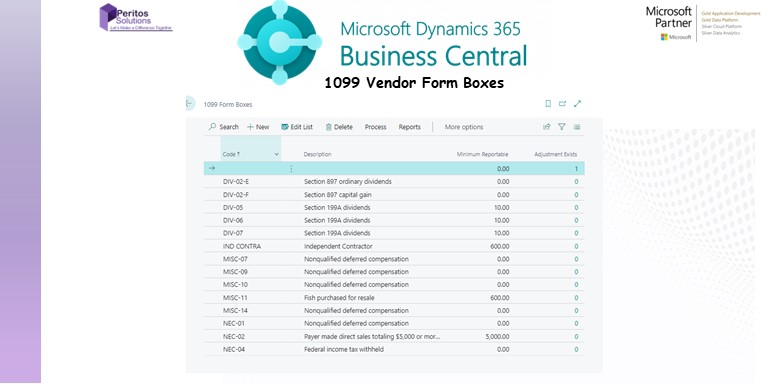
            Business Central 1099 Forms Setup Boxes are automatically present in the system and they are updated through Job Queue Entries. (NOTE: The 1099 reports will only be generated for all vendors above the minimum reportable amount for the assigned 1099 code, and the payments must be applied to the purchase invoices within the same calendar year.) To review the minimum amounts of each 1099 IRS Code:

            • Open the global search and look for “1099 form boxes”. In the 1099 Form Boxes window, you will find the 1099 codes and their minimum reportable amounts.
            • Click on the “Edit List” option to modify any of the amounts and these changes will be saved once you close the window.

            Business Central 1099 Forms Setup  

            • To set up a 1099 vendor: Open the vendors’ list and select the vendor that you will be setting up as a 1099 vendor.
             
            1099 Vendor List Form
            • Within the Payments Fast Tab, select the IRS 1099 Code for the vendor and enter their Federal ID number.
             
             Vendor Card
            • Click on the back arrow in the top left of the vendor card to save the changes.

            Transaction Processing for Business Central 1099 Forms Setup

            • You can add the IRS Code automatically to the transaction under the Shipping and Payment Fast Tab. For this transaction, the code can be overridden to a different 1099 code or removed all together.

            How to quickly setup Business Central 1099 Forms?

            • Within the lines section, the IRS 1099 Liable Field will automatically populate, if an IRS 1099 Code is assigned to a document. If the line item is not 1099 liable, you can unmark this field.

             Vendor Forms with Microsoft Business Central Final Vendor Amount

            1099 Corrections

            Corrections to vendor 1099 amounts can be done within the Vendor Ledger Entries Window. In this window, you can review the list of invoices and assign the IRS 1099 Code and amount for the total 1099 amounts to be reflected appropriately.


            Vendor Ledger Entries Window Once you are done correcting the transactions, you can run the “Vendor 1099 Information” report to verify the totals.

            Conclusion

            Business Central 1099 Forms Setup is extremely easy. 1099 forms is a great feature offered by Microsoft Dynamics 365 Finance as once you setup the a vendor as 1099 vendor, the amounts start to track in the software throughout the year. You can follow the steps given above to setup your forms quickly.   Reference:

            https://docs.microsoft.com/en-us/dynamics365/business-central/localfunctionality/unitedstates/set-up-use-irs1099-form

            Proud Blogs that
            make us stand
            out

            SAP Fieldglass Resume Ranking setup Recent Home

            S/4 Hana

            SAP Fieldglass Resume Ranking setup

            Ensure seamless SAP Integration | Secure Access | Auth0 with third-party APIs. Secure authentication &…

            Choosing the Right O365 Subscription: Monthly, Annual & Hybrid Commitments Recent Home

            sub -O365

            Choosing the Right O365 Subscription: Monthly, Annual & Hybrid Commitments

            This article explores the various Microsoft 365 subscription models—monthly, annual, and hybrid—and helps you choose…

            Peritos Wins Globalisation Excellence Award | MSME Star Stories 2024 Recent Home

            Awards

            Peritos Wins Globalisation Excellence Award | MSME Star Stories 2024

            Peritos Solutions is proud to be a winner in the “Globalisation Excellence” category at MSME…

            Peritos Wins at NABH Quality Connect Fiesta 2024 Recent Home

            Awards

            Peritos Wins at NABH Quality Connect Fiesta 2024

            Peritos proudly receives the NABH Quality Connect Healthcare Quality Pitch Award at the 2024 Competitions…

            Peritos: New Zealand ICT Award Finalist for Technical Award 2025 Recent Home

            Awards

            Peritos: New Zealand ICT Award Finalist for Technical Award 2025

            Peritos Solutions has been named a finalist for the 2025 New Zealand ICT Technical Award,…

            Thinking about a project? Get in touch with us.

            Connect with Us Today through the Details Below or Fill
            Out the Form for a Prompt Response

            Book Free Consultation

            Guaranteed response within 8 business hours.


              Trusted by Startups and Fortune 500 companies

              07+ years of experience

              We can handle projects of all complexities.

              100+ satisfied customers

              Startups to Fortune 500, we have worked with all.

              20+ in-house team

              Top 1% industry talent to ensure your digital success.

              Business Central Bank Reco page does not open up

              Business Central Bank Reco page does not open up

              Read this step-by-step guide if the Business Central Bank Reco page does not open up for you.

              Business Central Bank Reco page does not open up

              Introduction: Business Central Bank Reco page does not open up

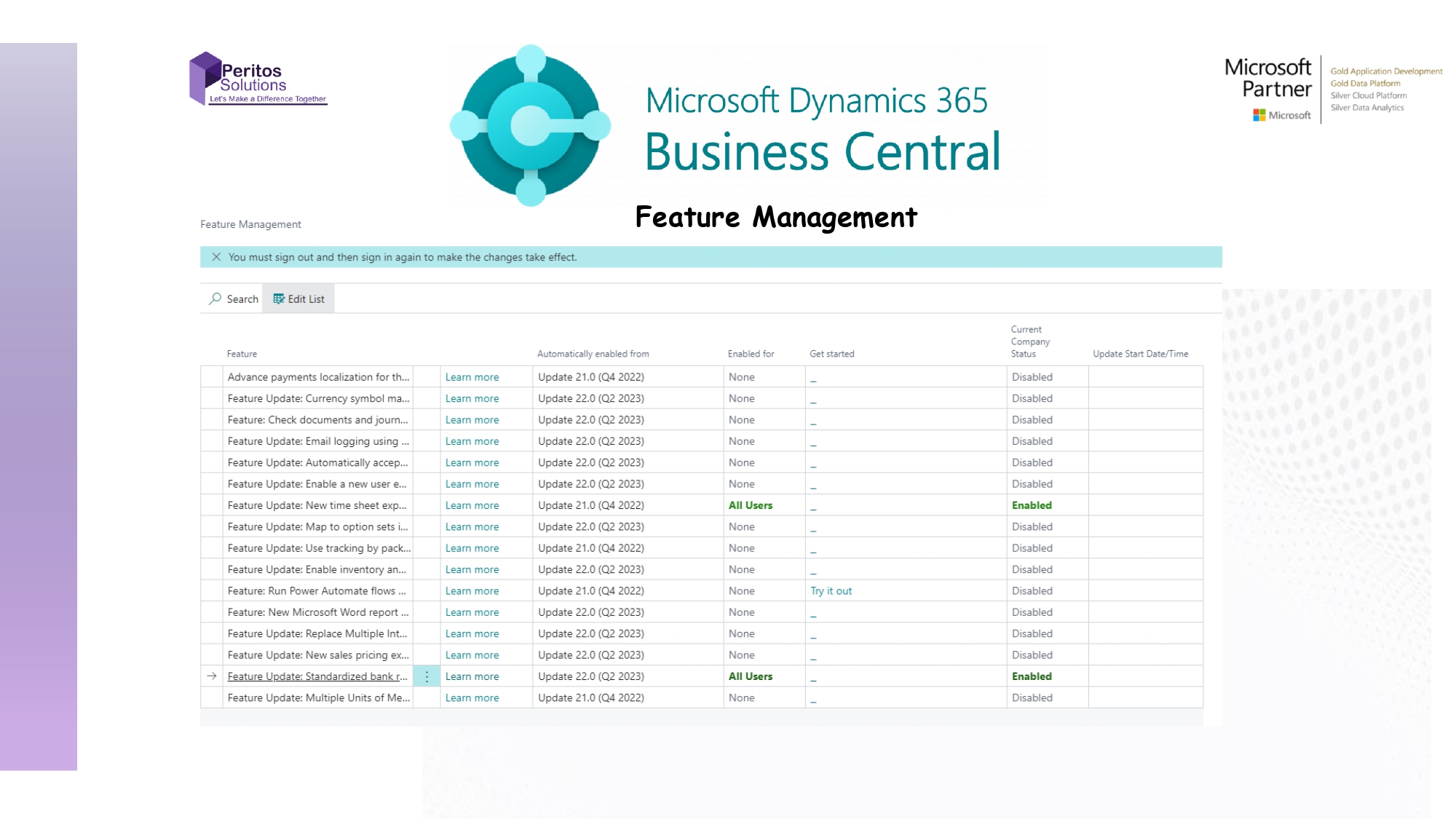
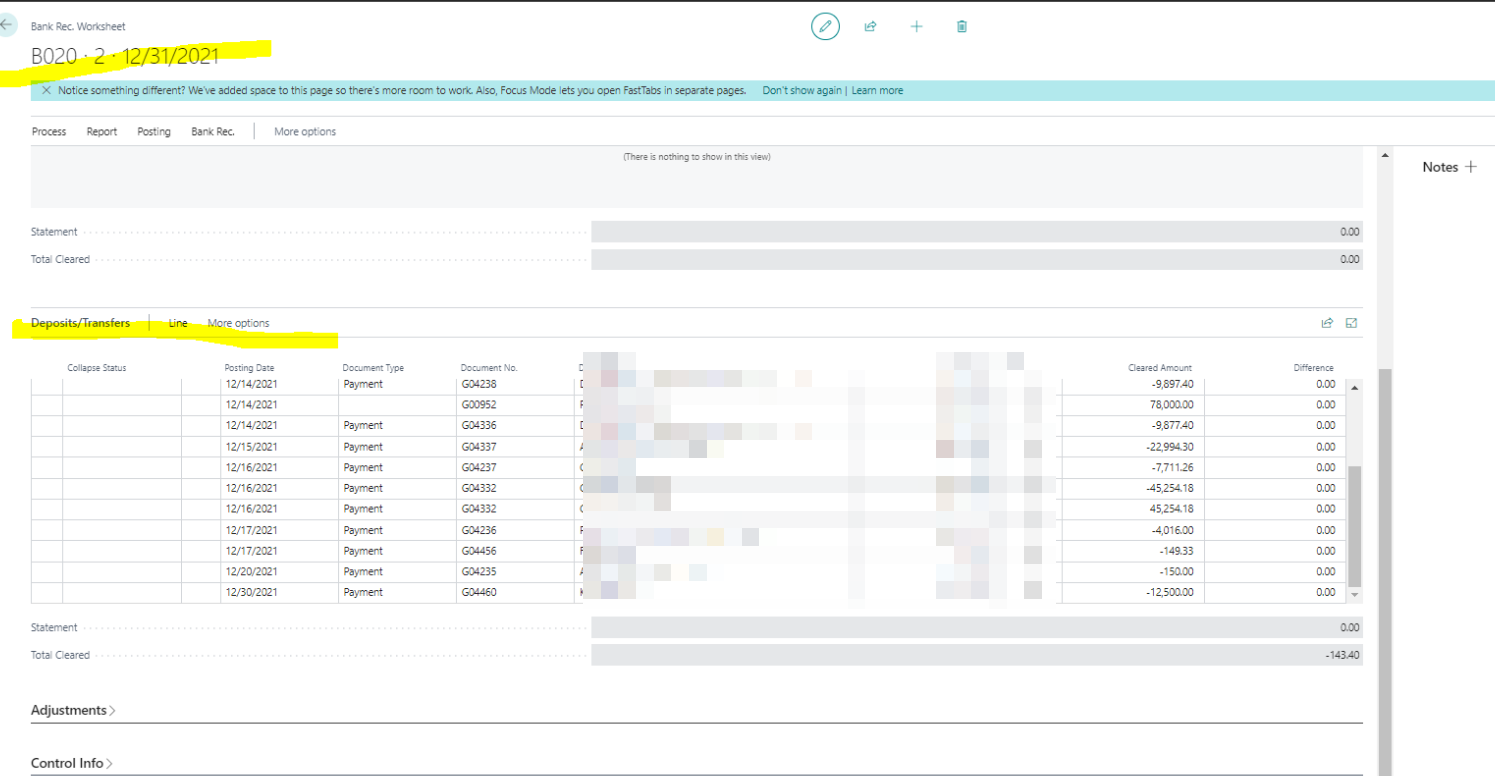
              In this article, we will talk about the Business Central Bank Reco page does not open up. Have you ever noticed that sometimes when you search for bank reco, Business Central does not open the bank reco screen but instead opens the Bank Rec Worksheet? This issue is faced by a lot of users and so, this article talks about resolving it. This issue majorly happens after an upgrade when you setup a new environment. Sometimes, the issue also arises randomly. Then Microsoft rolls out new updates and features and as an administrator, you can turn on the new features using the Feature Management page.   Note that the features may be switched off by default, but can be enabled/disabled as required by the business.

              What to do when Business Central Bank Reco does not open up?

              To resolve the issue then follow the steps below:

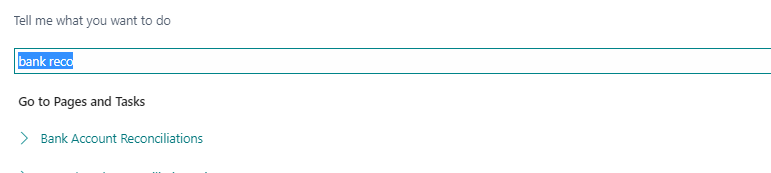
              • Sometimes, when you search for bank reconciliation by clicking on the search option
              Graphical user interface, application Description automatically generated
              •  It opens the Bank Rec Worksheet as seen below,
              Graphical user interface, application, email Description automatically generated
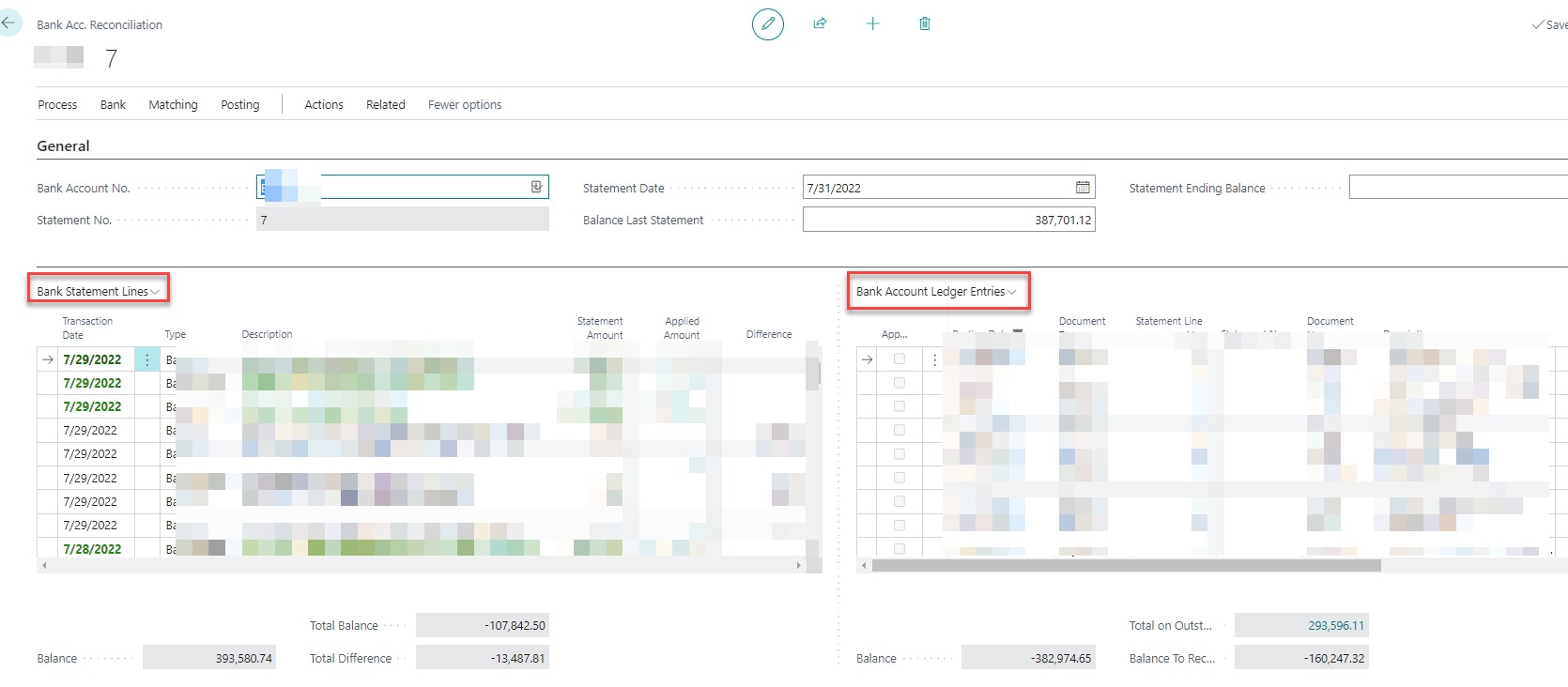
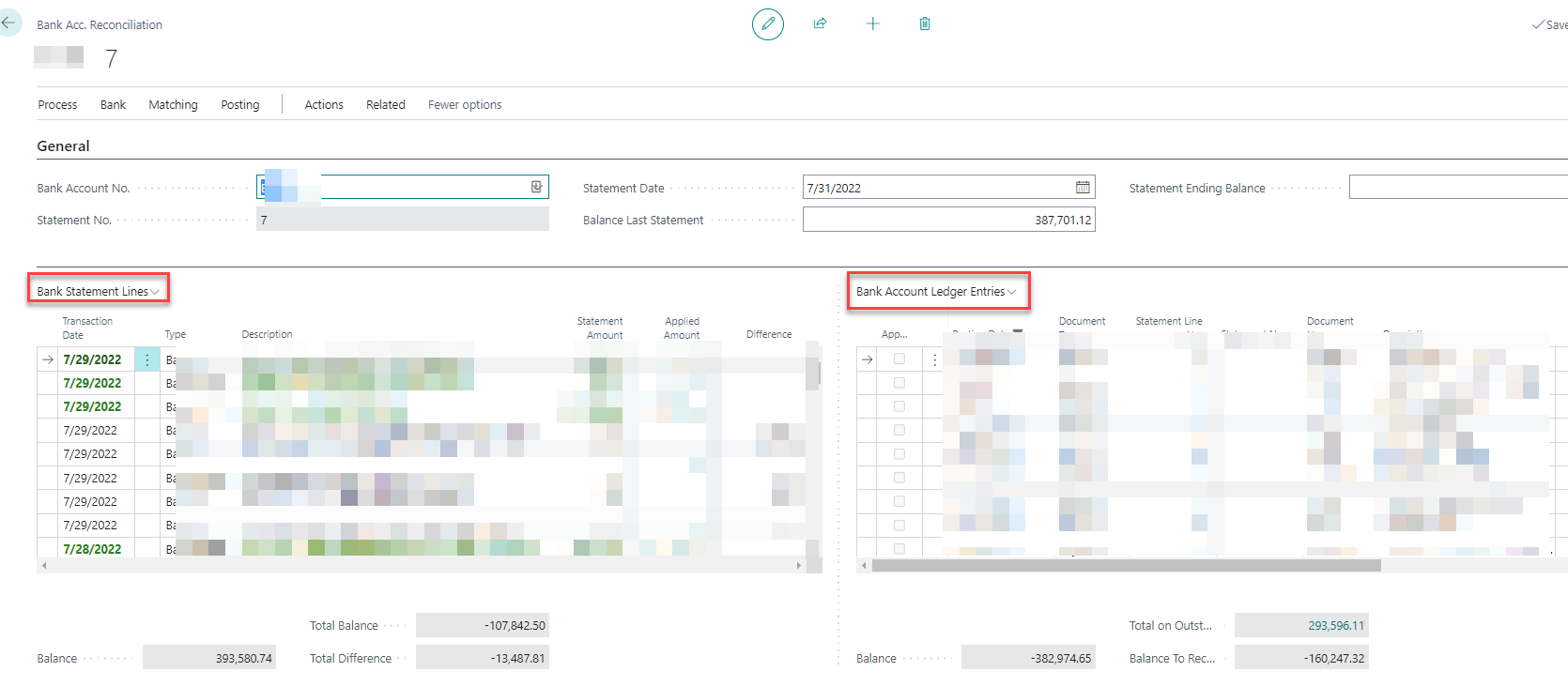
              • Instead of the split bank reco screen which was expected as below, showing statement lines and bank ledger entries on the right side
              Graphical user interface, application Description automatically generated

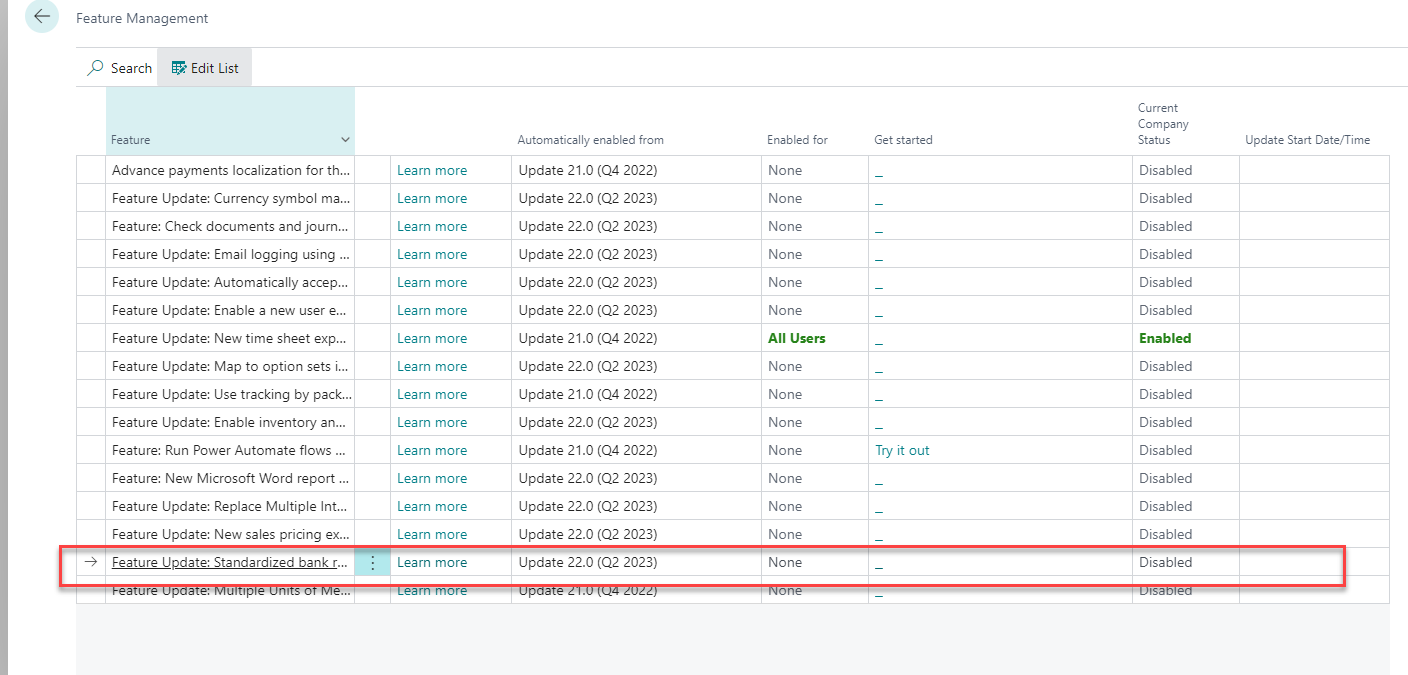
              To fix the issue search for Feature Management. Then When you do that, the below window should open up.

              • Please select the field which says “Standardized Banking”
              Graphical user interface, application, table Description automatically generated
              • Ensure it is enabled for all users as seen below
              • This then allows to create bank reconciliation in the system and opens the right screen as seen below
              Graphical user interface, application Description automatically generated

              Conclusion- Business Central Reco does not open up

              In conclusion, Feature management can be used to enable and disable features for users. Then Using these simple steps with feature management will help you to resolve the issue of bank reco screen not opening up properly. References https://docs.microsoft.com/en-us/dynamics365/business-central/dev-itpro/administration/feature-management

              Proud Blogs that
              make us stand
              out

              SAP Fieldglass Resume Ranking setup Recent Home

              S/4 Hana

              SAP Fieldglass Resume Ranking setup

              Ensure seamless SAP Integration | Secure Access | Auth0 with third-party APIs. Secure authentication &…

              Choosing the Right O365 Subscription: Monthly, Annual & Hybrid Commitments Recent Home

              sub -O365

              Choosing the Right O365 Subscription: Monthly, Annual & Hybrid Commitments

              This article explores the various Microsoft 365 subscription models—monthly, annual, and hybrid—and helps you choose…

              Peritos Wins Globalisation Excellence Award | MSME Star Stories 2024 Recent Home

              Awards

              Peritos Wins Globalisation Excellence Award | MSME Star Stories 2024

              Peritos Solutions is proud to be a winner in the “Globalisation Excellence” category at MSME…

              Peritos Wins at NABH Quality Connect Fiesta 2024 Recent Home

              Awards

              Peritos Wins at NABH Quality Connect Fiesta 2024

              Peritos proudly receives the NABH Quality Connect Healthcare Quality Pitch Award at the 2024 Competitions…

              Peritos: New Zealand ICT Award Finalist for Technical Award 2025 Recent Home

              Awards

              Peritos: New Zealand ICT Award Finalist for Technical Award 2025

              Peritos Solutions has been named a finalist for the 2025 New Zealand ICT Technical Award,…

              Thinking about a project? Get in touch with us.

              Connect with Us Today through the Details Below or Fill
              Out the Form for a Prompt Response

              Book Free Consultation

              Guaranteed response within 8 business hours.


                Trusted by Startups and Fortune 500 companies

                07+ years of experience

                We can handle projects of all complexities.

                100+ satisfied customers

                Startups to Fortune 500, we have worked with all.

                20+ in-house team

                Top 1% industry talent to ensure your digital success.

                Business Central VS SAP and SAGE

                Business Central VS SAP and SAGE

                Acquire a better understanding of the top ERPs-Business Central VS SAP and SAGE, an honest comparison of the three.

                Business Central Sage SAP vs BC

                The top ERPs for startups-Business Central, an Honest Comparison

                Business Central is the top ERPs for startups designed specifically for startups,small and medium-range enterprises. But why should you not be able to still compare the top ERP platforms like Business Central VS SAP and SAGE; out there and decide for yourself which is the best fit for your business? Our confidence stems from the exhaustive research we have done and you should be presented with the same opportunity.

                So here we will compare the 3 top ERPs Business Central VS SAP-Business one and SAGE 50, for startups out there today. We have condensed the features to the most relevant ones and then initiated a comparison so that you may be able to gauge which ERP is the best based on numerous parameters. Then we have elected to score the 3 ERP platforms on a scale of 1 to 5 depending on how they perform on the parameter in question.

                The Comparison of the top ERPs-Business Central VS SAP and SAGE

                # 

                Features  

                Microsoft Business central 

                SAP- Business one 

                SAGE 50 

                1.  

                Free Trial Option  


                Sign in and get started or get a partner to show you a demo and there can be many 

                ***** 


                Request a demo or get in touch with a partner but will be limited to find 

                ** 

                Request a demo or get in touch with a partner and even lesser options to find someone  


                2. 

                Ease of Implementation 

                Easy to get started, Demo company has got configuration packages which can be moulded to the client’s requirement  


                ***** 

                Difficult to manage and implement hence even for a partner would require time. Complicated UI can take some time to understand  

                ***  

                Still relying on old User interface and does not have a lot of features which can be used to map business processes  


                3. 

                Core Modules (Sales, Purchasing, Inventory, Accounting, Banking)  

                All core modules are extensively developed and can be used to cover all major business processes  


                ***** 

                All core modules are extensively developed and can be used to cover all major business processes  


                ***** 

                Modules are developed but they do not have the same feature and functionality as other ERPs  

                *** 

                4. 

                Customer interface  

                There is no simpler and easy-to-use UI having worked with different ERP systems than business central  


                ***** 

                There are UI issues and can be cumbersome to use or customize and that is a known issue with most SAP systems  

                *** 

                Easy to use interface but limited functionalities to customize  


                ** 

                5. 

                Data management  

                Stored in configuration packages easy to view, download or create your own package, Downloadable to excel 


                ***** 

                SAP Business One Data Transfer Workbench can be used it is recommended to use with a partner and does not allow posted documents to be migrated over  


                **** 

                Difficult to export and import the data as you have to do it one by one for each file instead of getting downloaded as a package. Also, the formatting of the columns and data validations are not in place makes the data clean up a mandatory task  

                6. 

                Excel-based reporting  

                Being a Microsoft product there is tight integration with Excel to download, upload and modify and can be integrated directly with Power BI  

                ***** 

                Data can be downloaded to excel but not as efficient as business central  


                *** 

                Ability to migrate data from Excel but not as compatible as expected  


                ** 

                7. 

                Outlook integration 

                Outlook based integration allows to read, write and Automation to show customer insight based on email reply  

                ***** 

                No outlook or email integration available 


                ()  

                No outlook or email integration available  


                () 

                8. 

                Automation  

                Integration with Power automate with a whole bunch of predefined templates here supported by Microsoft , There are AI and ML based integration along with Integration with Power BI  

                ***** 

                Not so many options but can be done with some 3rd Party tools like UI path, Custom apps 


                Limited capacities with Sage AP Automation  

                But not for SAGE 50  


                () 


                9. 

                Ongoing Support requirements 

                Customer does not need more than 2 functionals and 1 Technical if there is a basic implementation as an ongoing support approx. 20 hrs a week should be enough to support a small business  

                2 consultants * 10 ~20 Hrs a week each Approx 40-80 hrs a month and can be found easily and are not so expensive between 20-50 USD 

                This assumed there is no changes or complicated business process only implementation of core modules and min level of configuration changes needed each week 

                ***** 


                With SAP it is important to note that not one person would specialize in entire ERP, and you may need multiple functionals and technical implement and support for the project.  

                Also for customizations and Development changes, it required a dedicated partner or Inhouse team as it could take a week to 2 weeks for any minor change to go to production  

                Also keeping in mind that SAP resources and vendors are expensive to find and hire starting from 50 USD/ hr and going up to 125 USD Per hr  

                ** 

                There is not much requirement of ongoing support as there is little to no changes which you can really do, hence after the customer takes over they can pretty much run the show themselves  

                SAGE Support consultants are also not quite common to find in the market as there is not much demand and budget with the client who chooses to implement SAGE  


                ** 

                10. 

                Integration with 3rd Parties 

                Appsource shows 2159 apps on the store and adding more each week  

                See the link here 


                ***** 

                SAP business one shows around 47 apps that can be integrated into SAP b1  check the link here  

                ** 

                SAGE has 15 apps that shows on store page here  


                11. 

                Security & Authentication 


                • Data encryption 
                • Active directory-based integration & authentication 
                • Sync users from Azure AD 
                • Extensive and easy to use permission settings on a simple UI 
                • Granular level permission control Database level, Company, Object level, and Record level security  

                ***** 

                Security features as below are support but are not straight forward to customize or change if need be and setup would require an expert SAP consultant to manage the system.   

                • Database encrypted 
                • SLD based authentication 
                • Single Sign on 
                • Access Log 
                • Change Logs 


                *** 

                Audit trail  

                Backup and Restore services 

                Creating User ID and password for admin and different users with roles and permissions  

                1. Does not integrate with Active directory   


                ** 

                12. 

                License Cost  

                Upfront and Cost effective with monthly cost and no hidden price. It is a value for money as you get  

                With Business Central, users get a free Power BI license that provides access to the most common features in Business Central and Power BI.  

                8$ > 70$ > 100$  


                ***** 

                Quote based pricing and if the customer is not aware or does not have a good negotiation capability they can be charged a lot more than usual  


                ** 

                Monthly subscription Fees and no hidden costs.  


                33$ > 52$ > 87$ 


                *** 

                13. 

                Customizations 

                Customers can make changes on all tables, and configuration packages as well as any of the UI Level changes as needed. This is supported by extensions, 3rd Party Tools, Development packages, and config options to cater to multiple business scenarios 


                ***** 

                Customizations can be done but using SAP SDK and B1 APIs none of the two are easy to implement or manage. SAP is known for its complicated UI  and backend and for a smaller client to afford many hrs of customizations may not be a feasible option 


                *** 

                Not much options to customize the system. Except adding some fields and doing some Print layout changes for documents  


                ** 

                14. 

                Compliance  

                Business central compliance listing can be found here 

                Supports: GDPR, Helps complies to SOX Compliance, IAS / IFRS  

                HIPPA compliant, Multiple ISO certifications, FERPA certified   

                ***** 

                Supports GDPR compliance  

                SAP is multiple ISO certified company but there is no specific detail on the product having the relevant certification  

                Supports GDPR and EU data privacy 

                ***  

                Sage data is stored in AWS cloud and is also multiple ISO Certified  


                *** 

                15. 

                Mobile App  

                A comprehensive app that allows you to get notifications, Approve, Create, and view documents and reports  

                ***** 

                A comprehensive app that allows you to get notifications, Approve, Create, and view documents and reports  

                ***** 

                Mobile app exits and covers most basic function but limited ability in terms of creating the document  


                *** 

                16. 

                Industry Specific  

                Mostly suited for All small to medium business  

                Partner add on which can be enabled for Industry-specific solutions  

                Mostly suited for All small to medium business  

                Partner add which can be enabled for Industry-specific solutions  


                * 

                SAGE has a specific module for Ecommerce which can be seen here  


                *** 

                17. 

                Localizations 

                Exists in most the countries  


                ***** 

                Exists in most the countries  


                ***** 

                Mostly for the US but not does exist for other countries  

                ** 

                18.

                Customer reviews  

                G2 34 reviews and 3.5 * 

                Capterra 97 reviews and 3.8 * 

                *** 

                G2 461 reviews and 4.2 * 

                Capterra 183 reviews and 4.2 ***** 

                G2 121 reviews and 4* 

                Capterra 254 reviews and 3.8 ***** 


                OVERALL SCORE  

                18*5 = 90 


                84 /90  


                93% Recommended  

                52/90  


                57% recommended 

                35/90  


                38% Recommended  

                To Sum Up-Business Central VS SAP and SAGE

                Hope this helps summarize the features and options which can help you get started in choosing the right software with some tangible metrics to compare.

                If you’d like to understand more, or get a free demonstration – please don’t hesitate to get in touch with us at the earliest.

                You can contact us by filling the form on our site or drop us an email at info@peritosweb-d0074db2fc-evccgwfjhbbbd6gw.z01.azurefd.net

                The top ERPs for startups-Business Central, an Honest Comparison

                Business Central is the top ERPs for startups designed specifically for startups,small and medium-range enterprises. But why should you not be able to still compare the top ERP platforms like Business Central VS SAP and SAGE; out there and decide for yourself which is the best fit for your business? Our confidence stems from the exhaustive research we have done and you should be presented with the same opportunity.

                So here we will compare the 3 top ERPs Business Central VS SAP-Business one and SAGE 50, for startups out there today. We have condensed the features to the most relevant ones and then initiated a comparison so that you may be able to gauge which ERP is the best based on numerous parameters. Then we have elected to score the 3 ERP platforms on a scale of 1 to 5 depending on how they perform on the parameter in question.

                The Comparison of the top ERPs-Business Central VS SAP and SAGE

                # 

                Features  

                Microsoft Business central 

                SAP- Business one 

                SAGE 50 

                1.  

                Free Trial Option  


                Sign in and get started or get a partner to show you a demo and there can be many 

                ***** 


                Request a demo or get in touch with a partner but will be limited to find 

                ** 

                Request a demo or get in touch with a partner and even lesser options to find someone  

                *  

                2. 

                Ease of Implementation 

                Easy to get started, Demo company has got configuration packages which can be moulded to the client’s requirement  


                ***** 

                Difficult to manage and implement hence even for a partner would require time. Complicated UI can take some time to understand  

                ***  

                Still relying on old User interface and does not have a lot of features which can be used to map business processes  


                3. 

                Core Modules (Sales, Purchasing, Inventory, Accounting, Banking)  

                All core modules are extensively developed and can be used to cover all major business processes  


                ***** 

                All core modules are extensively developed and can be used to cover all major business processes  


                ***** 

                Modules are developed but they do not have the same feature and functionality as other ERPs  

                *** 

                4. 

                Customer interface  

                There is no simpler and easy-to-use UI having worked with different ERP systems than business central  


                ***** 

                There are UI issues and can be cumbersome to use or customize and that is a known issue with most SAP systems  

                *** 

                Easy to use interface but limited functionalities to customize  


                ** 

                5. 

                Data management  

                Stored in configuration packages easy to view, download or create your own package, Downloadable to excel 


                ***** 

                SAP Business One Data Transfer Workbench can be used it is recommended to use with a partner and does not allow posted documents to be migrated over  


                **** 

                Difficult to export and import the data as you have to do it one by one for each file instead of getting downloaded as a package. Also, the formatting of the columns and data validations are not in place makes the data clean up a mandatory task  

                6. 

                Excel-based reporting  

                Being a Microsoft product there is tight integration with Excel to download, upload and modify and can be integrated directly with Power BI  

                ***** 

                Data can be downloaded to excel but not as efficient as business central  


                *** 

                Ability to migrate data from Excel but not as compatible as expected  


                ** 

                7. 

                Outlook integration 

                Outlook based integration allows to read, write and Automation to show customer insight based on email reply  

                ***** 

                No outlook or email integration available 


                ()  

                No outlook or email integration available  


                () 

                8. 

                Automation  

                Integration with Power automate with a whole bunch of predefined templates here supported by Microsoft , There are AI and ML based integration along with Integration with Power BI  

                ***** 

                Not so many options but can be done with some 3rd Party tools like UI path, Custom apps 


                Limited capacities with Sage AP Automation  

                But not for SAGE 50  


                () 


                9. 

                Ongoing Support requirements 

                Customer does not need more than 2 functionals and 1 Technical if there is a basic implementation as an ongoing support approx. 20 hrs a week should be enough to support a small business  

                2 consultants * 10 ~20 Hrs a week each Approx 40-80 hrs a month and can be found easily and are not so expensive between 20-50 USD 

                This assumed there is no changes or complicated business process only implementation of core modules and min level of configuration changes needed each week 

                ***** 


                With SAP it is important to note that not one person would specialize in entire ERP, and you may need multiple functionals and technical implement and support for the project.  

                Also for customizations and Development changes, it required a dedicated partner or Inhouse team as it could take a week to 2 weeks for any minor change to go to production  

                Also keeping in mind that SAP resources and vendors are expensive to find and hire starting from 50 USD/ hr and going up to 125 USD Per hr  

                ** 

                There is not much requirement of ongoing support as there is little to no changes which you can really do, hence after the customer takes over they can pretty much run the show themselves  

                SAGE Support consultants are also not quite common to find in the market as there is not much demand and budget with the client who chooses to implement SAGE  


                ** 

                10. 

                Integration with 3rd Parties 

                Appsource shows 2159 apps on the store and adding more each week  

                See the link here 


                ***** 

                SAP business one shows around 47 apps that can be integrated into SAP b1  check the link here  

                ** 

                SAGE has 15 apps that shows on store page here  


                11. 

                Security & Authentication 


                • Data encryption 
                • Active directory-based integration & authentication 
                • Sync users from Azure AD 
                • Extensive and easy to use permission settings on a simple UI 
                • Granular level permission control Database level, Company, Object level, and Record level security  

                ***** 

                Security features as below are support but are not straight forward to customize or change if need be and setup would require an expert SAP consultant to manage the system.   

                • Database encrypted 
                • SLD based authentication 
                • Single Sign on 
                • Access Log 
                • Change Logs 


                *** 

                Audit trail  

                Backup and Restore services 

                Creating User ID and password for admin and different users with roles and permissions  

                1. Does not integrate with Active directory   


                ** 

                12. 

                License Cost  

                Upfront and Cost effective with monthly cost and no hidden price. It is a value for money as you get  

                With Business Central, users get a free Power BI license that provides access to the most common features in Business Central and Power BI.  

                8$ > 70$ > 100$  


                ***** 

                Quote based pricing and if the customer is not aware or does not have a good negotiation capability they can be charged a lot more than usual  


                ** 

                Monthly subscription Fees and no hidden costs.  


                33$ > 52$ > 87$ 


                *** 

                13. 

                Customizations 

                Customers can make changes on all tables, and configuration packages as well as any of the UI Level changes as needed. This is supported by extensions, 3rd Party Tools, Development packages, and config options to cater to multiple business scenarios 


                ***** 

                Customizations can be done but using SAP SDK and B1 APIs none of the two are easy to implement or manage. SAP is known for its complicated UI  and backend and for a smaller client to afford many hrs of customizations may not be a feasible option 


                *** 

                Not much options to customize the system. Except adding some fields and doing some Print layout changes for documents  


                ** 

                14. 

                Compliance  

                Business central compliance listing can be found here 

                Supports: GDPR, Helps complies to SOX Compliance, IAS / IFRS  

                HIPPA compliant, Multiple ISO certifications, FERPA certified   

                ***** 

                Supports GDPR compliance  

                SAP is multiple ISO certified company but there is no specific detail on the product having the relevant certification  

                Supports GDPR and EU data privacy 

                ***  

                Sage data is stored in AWS cloud and is also multiple ISO Certified  


                *** 

                15. 

                Mobile App  

                A comprehensive app that allows you to get notifications, Approve, Create, and view documents and reports  

                ***** 

                A comprehensive app that allows you to get notifications, Approve, Create, and view documents and reports  

                ***** 

                Mobile app exits and covers most basic function but limited ability in terms of creating the document  


                *** 

                16. 

                Industry Specific  

                Mostly suited for All small to medium business  

                Partner add on which can be enabled for Industry-specific solutions  

                Mostly suited for All small to medium business  

                Partner add which can be enabled for Industry-specific solutions  


                * 

                SAGE has a specific module for Ecommerce which can be seen here  


                *** 

                17. 

                Localizations 

                Exists in most the countries  


                ***** 

                Exists in most the countries  


                ***** 

                Mostly for the US but not does exist for other countries  

                ** 

                18.

                Customer reviews  

                G2 34 reviews and 3.5 * 

                Capterra 97 reviews and 3.8 * 

                *** 

                G2 461 reviews and 4.2 * 

                Capterra 183 reviews and 4.2 ***** 

                G2 121 reviews and 4* 

                Capterra 254 reviews and 3.8 ***** 


                OVERALL SCORE  

                18*5 = 90 


                84 /90  


                93% Recommended  

                52/90  


                57% recommended 

                35/90  


                38% Recommended  

                To Sum Up-Business Central VS SAP and SAGE

                Hope this helps summarize the features and options which can help you get started in choosing the right software with some tangible metrics to compare.

                If you’d like to understand more, or get a free demonstration – please don’t hesitate to get in touch with us at the earliest.

                You can contact us by filling the form on our site or drop us an email at info@peritosweb-d0074db2fc-evccgwfjhbbbd6gw.z01.azurefd.net

                Proud Blogs that
                make us stand
                out

                SAP Fieldglass Resume Ranking setup Recent Home

                S/4 Hana

                SAP Fieldglass Resume Ranking setup

                Ensure seamless SAP Integration | Secure Access | Auth0 with third-party APIs. Secure authentication &…

                Choosing the Right O365 Subscription: Monthly, Annual & Hybrid Commitments Recent Home

                sub -O365

                Choosing the Right O365 Subscription: Monthly, Annual & Hybrid Commitments

                This article explores the various Microsoft 365 subscription models—monthly, annual, and hybrid—and helps you choose…

                Peritos Wins Globalisation Excellence Award | MSME Star Stories 2024 Recent Home

                Awards

                Peritos Wins Globalisation Excellence Award | MSME Star Stories 2024

                Peritos Solutions is proud to be a winner in the “Globalisation Excellence” category at MSME…

                Peritos Wins at NABH Quality Connect Fiesta 2024 Recent Home

                Awards

                Peritos Wins at NABH Quality Connect Fiesta 2024

                Peritos proudly receives the NABH Quality Connect Healthcare Quality Pitch Award at the 2024 Competitions…

                Peritos: New Zealand ICT Award Finalist for Technical Award 2025 Recent Home

                Awards

                Peritos: New Zealand ICT Award Finalist for Technical Award 2025

                Peritos Solutions has been named a finalist for the 2025 New Zealand ICT Technical Award,…

                Thinking about a project? Get in touch with us.

                Connect with Us Today through the Details Below or Fill
                Out the Form for a Prompt Response

                Book Free Consultation

                Guaranteed response within 8 business hours.


                  Trusted by Startups and Fortune 500 companies

                  07+ years of experience

                  We can handle projects of all complexities.

                  100+ satisfied customers

                  Startups to Fortune 500, we have worked with all.

                  20+ in-house team

                  Top 1% industry talent to ensure your digital success.

                  Use Business Central to boost your retail business’s sales efficiency and transparency instantly!

                  Use Business Central to boost your retail business’s sales efficiency and transparency instantly!

                  Earlier ERP was the domain of large enterprises. Today, Microsoft Dynamics has created an affordable ERP system specifically from the perspective of Small and Mid-range enterprises. Welcome to Business Central.

                  Use Business Central To Boost Your Retail Business’s Sales Efficiency And Transparency Instantly!

                  Business Central is the perfect ERP tool to assist your Retail Business by bringing innovation to sales. The hypercompetitive retail industry requires constant innovation in order to make itself survivable and viable, as you being a retail business owner will know. Sales is an area within retail that has the potential to become completely transparent while also boosting the efficiency of the entire Retail Business. Conversely, not upgrading a retail business’s sales profile can result in being easily outpaced by your competition while letting redundancy creep into your business operations. Check out the various ways in which Business Central can help optimise your Retail Business’s sales operations:

                  1. Sales Source Analysis Business Central allows you to tag your sales representatives and other sales sources so that you know exactly how each of these is performing. This way you can optimise those nodes which are getting you the most revenue while you can either modify or eliminate the nodes that are performing the worst. This can be done iteratively to always ensure that your business maximises its profitability.

                  2. Unique Customer Creation: Business Central revolutionises how you look at the source of your sales order by ensuring it is customer-oriented and not platform oriented. This ensures that even if your retail business is to receive two orders from two platforms, but from the same customer, then the orders will be credited to the single customer instead of creating two separate customer entities. This is a great asset when it comes to reconciling payments.

                  3. Seamless Dropshipping: Using Business Central, when you place an order which needs to be drop shipped are you able to inform the purchaser immediately. You can create a Purchase order using the line from the sales order itself which helps you track the shipment that should be sent by the Vendor and would be updated in the system on the sales order as well when shipped. This saves time and reduces complexity within your system.

                  4. Managing Error: Business Central has created an almost artistic system through which it can handle cancellation of orders, correction of incorrect orders and refunds seamlessly. This system is virtually automated and requires minimal guidance to keep it operational saving your business hundreds of man hours.

                  5. Seamless Integration: Business Central ensures near seamless integration with different systems like Amazon, e-bay, WooCommerce, and others. In this manner, Business Central automates the tedious and manual process of creating these orders in your retail business system. This is an especially useful feature for Retail businesses that are expanding as they will scale up t receiving thousands of orders a day, and with that volume, seamless automation is the only way forward, something that Business Central guarantees.

                  Conclusion

                  Peritos Solutions has helped many retail businesses by helping to integrate Business Central is the working of their business after understanding how to perfectly customise the ERP to suit each unique business operation. In fact, please read our e-book which details how Business Central can assist with all operations within a retail business and make them more optimal and efficient. Given its unparalleled customization as well as compartmentalization, Business Central is uniquely suited to assist your Retail Business, whatever its size, to become better and more profitable.

                  Proud Blogs that
                  make us stand
                  out

                  SAP Fieldglass Resume Ranking setup Recent Home

                  S/4 Hana

                  SAP Fieldglass Resume Ranking setup

                  Ensure seamless SAP Integration | Secure Access | Auth0 with third-party APIs. Secure authentication &…

                  Choosing the Right O365 Subscription: Monthly, Annual & Hybrid Commitments Recent Home

                  sub -O365

                  Choosing the Right O365 Subscription: Monthly, Annual & Hybrid Commitments

                  This article explores the various Microsoft 365 subscription models—monthly, annual, and hybrid—and helps you choose…

                  Peritos Wins Globalisation Excellence Award | MSME Star Stories 2024 Recent Home

                  Awards

                  Peritos Wins Globalisation Excellence Award | MSME Star Stories 2024

                  Peritos Solutions is proud to be a winner in the “Globalisation Excellence” category at MSME…

                  Peritos Wins at NABH Quality Connect Fiesta 2024 Recent Home

                  Awards

                  Peritos Wins at NABH Quality Connect Fiesta 2024

                  Peritos proudly receives the NABH Quality Connect Healthcare Quality Pitch Award at the 2024 Competitions…

                  Peritos: New Zealand ICT Award Finalist for Technical Award 2025 Recent Home

                  Awards

                  Peritos: New Zealand ICT Award Finalist for Technical Award 2025

                  Peritos Solutions has been named a finalist for the 2025 New Zealand ICT Technical Award,…

                  Thinking about a project? Get in touch with us.

                  Connect with Us Today through the Details Below or Fill
                  Out the Form for a Prompt Response

                  Book Free Consultation

                  Guaranteed response within 8 business hours.


                    Trusted by Startups and Fortune 500 companies

                    07+ years of experience

                    We can handle projects of all complexities.

                    100+ satisfied customers

                    Startups to Fortune 500, we have worked with all.

                    20+ in-house team

                    Top 1% industry talent to ensure your digital success.

                    Business Central Reports and Ledger Entries

                    Business Central Reports and Ledger Entries

                    Understand the multiple Business central report and legder entries available for Audit review and stakeholder

                    Business Central Reports and Ledger Entries

                    Introduction – Business Central Reports & ledger entries

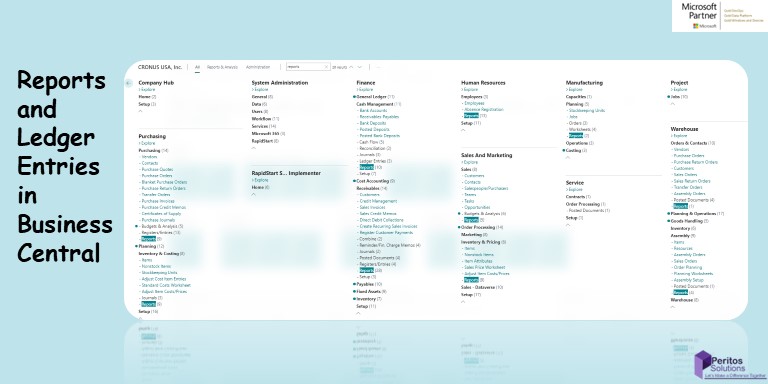
                    This blog talks about Business Central Reports & ledger entries that are available out of the box in Business Central on cloud version. In this Article we list down some of the most asked Business Central Reports & ledger entries specific to each module. 

                    1. Inventory reports
                    2. Finance reports
                    3. Ledger entries
                    4. Job Reports 

                    And also included a link to the standard documentation for more details on the reports available.

                    Inventory – Business Central Reports & ledger entries

                    The first module here we talk about for Business Central Reports & ledger entries is the inventory module

                    https://docs.microsoft.com/en-us/dynamics365/business-central/inventory-wms-reports

                    Furthermore, Lets look at the specific inventory reports in the sections below

                    Inventory Availability Plan Report:

                    If you would like to have an overview about specific items/stock keeping units and their availability. This report shows cumulated values like gross requirements, scheduled and planned receipts, the inventory, and so on.

                    Click on the search icon and enter Inventory Availability Plan report, and then choose the related link.

                    Business Central Reports and Ledger Entries

                    A new screen will be pop out like below

                    Business Central Reports & ledger entries

                    Select the options and click on Preview to see the report.

                    You can see the reports like below snippet.

                    Business Central Reports & ledger entries

                    Inventory Valuation Report:

                    Displays inventory valuation for selected items in your inventory. The report also shows information about the value of increases and decreases in inventory over time.

                    Click on the search icon and enter Inventory Valuation report, and then choose the related link.

                    Business Central Reports & ledger entries

                    A new window will be pop out like below snippet.

                    Business Central Reports & ledger entries

                    Select the required options and click on Preview to see the report preview.

                    Note: You need to provide a Start Date and End Date.

                    Click on Preview.

                    A report will be generated like below snippet.

                    Business Central Reports & ledger entries

                    Inventory Valuation Report:

                    Shows the open customer ledger entries until the ending date. This report shows similar content as the customer statement but with no indication if the entry is overdue. Note: The date filter will be applied to the detailed customer ledger entries. This means that if you have payments later than the ending date that have been applied to invoices in within the date range, the invoices will appear in the report as they have not been closed as per the ending date

                    Click on the search icon and enter Item Expiration – Quantity report, and then choose the related link. 

                      Business Central Reports and Ledger Entries

                    A new window will be pop out like below snippet. 

                      Business Central Reports and Ledger Entries

                     Select the required options and click on Preview to see the report preview. 

                    Click on Preview. 

                      Graphical user interface, text, application Description automatically generated

                    Inventory Cost and price list Report:

                    Displays a list of price information for the selected items or stockkeeping units: direct unit cost, last direct cost, unit price, profit percentage, and profit.

                      Business Central Reports and Ledger Entries

                    A new window will be pop out like below snippet.  

                      Graphical user interface, application Description automatically generated

                     A report will be generated like below snippet. 

                       Business Central Reports and Ledger Entries

                    Inventory Picking List Report:

                    Displays a list of the sales orders in which an item is included. The following information is shown for each item: sales order line with customer’s name, variant code, location code, bin code, shipment date, quantity to be shipped, and unit of measure. The quantity to be shipped is totaled for each item. The report can be used when items will be collected from the inventory.
                    NOTE: this functionality is not available for advanced warehouse functionality.

                    Click on the search icon and enter Inventory Picking List, and then choose the related link. 

                      Business Central Reports and Ledger Entries

                    A new window will be pop out like below snippet.  

                      Graphical user interface, application Description automatically generated

                     Select the required options and click on Preview to see the report preview. 

                    Click on Preview. 

                     A report will be generated like below snippet.

                       A picture containing calendar Description automatically generated

                    See availability of items

                    https://docs.microsoft.com/en-us/dynamics365/business-central/inventory-how-availability-overview

                    Finance Module – Business Central Reports & ledger entries

                    In  Business Central Reports & ledger entries functionality One of the most asked module for reporting and important for stakeholder is Finance Module. Here is the link to the standard report and we discuss more on the specific reports related to Finance in the section below 

                    https://docs.microsoft.com/en-us/dynamics365/business-central/finance-reports

                    Trial Balance:

                    Shows the chart of accounts with balances and net changes. You can choose to see a trial balance for selected dimensions. You can use the report at the close of an accounting period or fiscal year.

                    Click on the search icon and enter Trial Balance, and then choose the related link.

                    Graphical user interface, text, application, email Description automatically generated

                    A new screen will be pop out like below Business Central Reports and Ledger Entries

                    Select the options and click on Preview to see the report.

                    Note : You must select at least 1 report column and Date Filter

                    You can see the reports like below snippet.

                    Business Central Reports and Ledger Entries

                    Trial Balance by Period:

                    Shows the opening balance by general ledger account, the movements in the selected period of month, quarter, or year, and the resulting closing balance.

                    Click on the search icon and enter Trial Balance by Period report, and then choose the related link.

                    Graphical user interface, text, application Description automatically generated

                    A new window will be pop out like below snippet. Business Central Reports and Ledger Entries

                    Select the required options and click on Preview to see the report preview.

                    Note: You need to provide a Start Date

                    Click on Preview.

                    A report will be generated like below snippet.

                    Business Central Reports and Ledger Entries

                    Detailed Trial Balance Report:

                    Shows a detail trial balance for selected general ledger accounts. You can use the report at the close of an accounting period or fiscal year. You can define which accounts are included in the report by setting filters.

                    Click on the search icon and enter Detailed Trial Balance, and then choose the related link. 

                      Business Central Reports and Ledger Entries

                    A new window will be pop out like below snippet. 

                      Business Central Reports and Ledger Entries

                     Select the required options and click on Preview to see the report preview. 

                    Click on Preview.  A report will be generated like below snippet. 

                    Business Central Reports and Ledger Entries

                    Trial Balance/Previous Year Report:

                    Shows a trial balance in comparison to the previous year’s figures. You can choose to see a trial balance for selected dimensions. You can use the report at the close of an accounting period or fiscal year. The previous year means the same period one calendar year

                    Business Central Reports and Ledger Entries

                    A new window will be pop out like below snippet.  

                      Business Central Reports and Ledger Entries

                    Note: You need to provide a Start Date 

                    Click on Preview.  A report will be generated like below snippet. 

                       Graphical user interface, text Description automatically generated

                    Account Schedule Report:

                    Account schedules can be used to display the general ledger accounts in a different way than in the chart of accounts. For example, account schedules can be used for reports on key figures.

                    Click on the search icon and enter Account Schedule, and then choose the related link. 

                      Graphical user interface, text, application Description automatically generated

                    A new window will be pop out like below snippet.  

                      Business Central Reports and Ledger Entries

                    Select the required options and click on Preview to see the report preview. 

                    Note: You need to Provide Starting Date and End Date

                    Click on Preview. 

                     A report will be generated like below snippet. 

                       Graphical user interface, table Description automatically generated with medium confidence

                    Ledger entries – Business Central Reports & ledger entries

                    As the documents are posted in Business Central Reports & ledger entries are also created automatically. 
                    This means that system would no longer allow to manually change those entries. Moreover, It can be reversed for which a new ledger entry would come into place. This is one of the key features used by the auditors and CA for preparing and reviewing the financial statement accuracy.

                    Customer Ledger Entries

                    “Customer Ledger Entries” shows all the various documents we have posted against our customers. This is the main page that’s used when you want to see a full history of all the documents we have posted to our customers. Using this page, we can quickly see outstanding invoices, payments and much more. It also displays things like Posting Date, Document Type, Document Number, Customer No and then a variety of Amount columns.

                    All the amount columns are hyperlinks, which we can click to view more information on that amount.

                    To access Customer Ledger Entries, Click on the search icon and enter Customer Ledger Entries and then choose the related link.

                    Business Central Reports and Ledger Entries

                    A new screen will be pop out like below

                    Business Central Reports and Ledger Entries

                    Vendor Ledger Entries

                    “Vendor Ledger Entries” shows all the various documents we have posted against our Vendors. This is the main page that’s used when you want to see a full history of all the documents we have posted to our Vendors. Using this page, we can quickly see outstanding invoices, payments and much more. It also displays things like Posting Date, Document Type, Document Number, Vendor No and then a variety of Amount columns.

                    All the amount columns are hyperlinks, which we can click to view more information on that amount.

                    To access Vendor Ledger Entries, Click on the search icon and enter Vendor Ledger Entries and then choose the related link.

                    Business Central Reports and Ledger Entries

                    A new screen will be pop out like below

                    Business Central Reports and Ledger Entries

                    By click on Amount you can get the details like below

                    Business Central Reports and Ledger Entries

                    Item Ledger Entries

                    Item ledger entries are created every time that you post a change to your inventory quantity. This change could be a result of a receipt or shipment of goods because you post a negative or positive adjustment of quantity or consumption or output due to production.

                    These inventory records also carry the item’s item tracking numbers, which are the serial or lot number, if assigned.

                    Note: The Item Ledger Entry table only holds information about quantity. All amounts are listed in the Value Entry table.

                    Item ledger entries are created by the following:

                    1. The posting of an item journal line
                    2. The posting of a sales order, return order, invoice, or credit memo
                    3. The posting of a purchase order, return order, invoice, or credit memo.

                    Item ledger entries also result from the production of a BOM (bill of materials) in a BOM journal. Before you can create an item entry for the BOM you have produced, the program automatically creates an item entry for each of the component items that comprise the BOM.

                    For example, if a BOM is a table that consists of four legs and a tabletop, three item entries will be created: one for the BOM itself, the table (the entry is a positive adjustment because the inventory is increased by one table), and one for each of the items that comprise the table, that is, the tabletop and the legs (the entries are negative adjustments because the inventory is decreased by one tabletop and four legs). All three item entries have the same document number.

                    There are 5 different entry types in Item Ledger Entry.

                    Options

                    Description

                    Purchase and Positive Adjmt.

                    Represents an increase in inventory.

                    Note: If you use any of the Undo functions, such as Undo Receipt, then a corrective entry of type Purchase is created. The Correction check box is selected.

                    Sale and Negative Adjmt.

                    Represents a decrease in inventory.

                    Note: If you use any of the Undo functions, such as Undo Shipment function, then a corrective entry of type Sale is created. The Correction check box is selected.

                    Transfer

                    Represents transfers between locations or a reclassification journal posting.

                    Consumption and Output

                    Represents movements in manufacturing inventory.

                    Assembly Consumption and Assembly Output

                    Represents movements in assembly inventory.

                    To View Item Ledger Entries, follow the below steps

                    Step 2: Click on the search icon and enter Item Ledger Entries, and then choose the related link.

                    Business Central Reports and Ledger Entries

                    A new window will be populate like below

                    Business Central Reports and Ledger Entries

                    Here you can see different entry types such as Positive Adjustment, Negative Adjustment, Transfer, Sales, Purchase. Business Central Reports and Ledger Entries

                    1. Positive Adjustment

                    When we add inventory on an item using Item card inventory tab, an entry created in Item ledger entry table with entry type Positive adjustment.

                    Negative Adjustment

                    When we remove inventory on an item using Item card inventory tab, an entry created in Item ledger entry table with entry type Positive adjustment.

                    Transfer

                    These entries created when we transfer inventory between locations.

                    There are two Types of entry created in Transfer Entry type.

                    1. Transfer Shipment
                    2. Transfer Receipt

                    Transfer Shipment: These entries creates when we post the shipment of a transfer order.

                    Transfer Receipt: These entries creates when we post the Receiving of a transfer order.

                    For a single transfer order, there are two entries created in Item Ledger entry

                    Purchase

                    The entry is posted from a purchase order, invoice, or credit memo will be having Entry Type as Purchase in Item Ledger Entry Table. It represents an increase in inventory.

                    Sale

                    The entry is posted from a Sales order, invoice, or credit memo will be having Entry Type as Sales in Item Ledger Entry Table. It represents an decrease in inventory.

                    Item Ledger Entry Key Fields

                    Field Name

                    Field Description

                    Field Type

                    Remarks

                    Entry No.

                    Assigns entry number from specified series during entry creation process.

                    Integer

                    It is primary key of Item Ledger Entry

                    Posting Date

                    Specifies the posting date for the entry.

                    DateTime


                    Entry Type

                    Specifies which type of transaction that the entry is created from.

                    Integer

                    For example, a sale, purchase, positive adjustment, negative adjustment, consumption, output.

                    Document Type

                    Specifies what type of document was posted to create the item ledger entry.

                    Integer

                    For example: sales shipments, purchase receipts, sales returns, purchase order returns, transfer shipments or transfer receipts.

                    Document No.

                    Specifies entry’s document number based on the voucher it originated from.

                    Varchar

                    For example, if the document type was a sales shipment then this would be the posted sales shipment no.

                    Item No.

                    Specifies the number of the item in the entry.

                    Varchar


                    Location Code

                    Specifies the code for the location that the entry is linked to.

                    Varchar

                    For Example in a sales shipment entry location code means from which location product shipped

                    Quantity

                    Specifies the number of units of the item in the item entry.

                    Integer

                    The base unit of measure chosen for an item determines the quantity expressed. For instance, if a widget’s base unit is PCS (Pieces) and we purchase a box containing 1000 widgets, the related ILE will show a quantity of 1000.

                    Invoiced Quantity

                    Specifies how many units of the item on the line have been invoiced.

                    Integer


                    Remaining Quantity

                    Specifies the quantity in the Quantity field that remains to be processed.

                    Integer


                    Cost Amount (Actual)

                    Specifies the adjusted cost, in LCY, of the quantity posting.

                    Integer


                    Cost Amount (Non-Invtbl.)

                    Specifies assigned item charge for outbound entry’s adjusted non-inventoriable cost.

                    Integer


                    Open

                    Specifies whether the entry has been fully applied to.

                    Boolean

                    Once the remaining quantity of the ILE record becomes zero, the ‘open’ field is unchecked (set to no). By filtering with product name and the open field, you can determine if there is any available stock, which can be helpful.

                    Order Type

                    Specifies which type of order that the entry was created in.

                    Integer


                    Entry Description:

                    Business Central Reports and Ledger Entries

                    the record was posted on the 01/23/2021, as a sale using a posted sales shipment. The document number and quantity of item ‘1965-W’ are both stated too.

                    Breaking down the two types of ILE

                    Business Central Reports and Ledger Entries

                    There are two highlighted entries one is for purchase and another is for sales.

                    Item no. = 1968-S
                    Entry type = purchase
                    Document type = Purchase Receipt
                    Quantity = 6
                    Remaining quantity = 0
                    Open = no

                    If we sell six 1968-S using a sales order, then it will create the sale ILE. Below is an image showing the two ILE types on separate lines.

                    Business Central Reports and Ledger Entries

                    In this instance the sale ILE will be -6 due to the removal of stock, in the form of a sale. To achieve the sale, we will be consuming the inventory from our original purchase ILE, which now will have a remaining quantity of zero. This is because we started with 6 and lost six when the sale occurred.

                    Item no. = 1968-S
                    Entry type = sale
                    Document type = Sales Shipment
                    Quantity = -6
                    Remaining quantity = 0
                    Open = no

                    The purchase ILE will now look like this:

                    Item no. = Widget
                    Entry type = purchase
                    Document type = Purchase Receipt
                    Quantity = 10
                    Remaining quantity = 0 (6-6)
                    Open = no

                    General Ledger Entries

                    This list shows you all the transactions that have taken places for raw materials.

                    To access General Ledger Entries, click on the search icon and enter General Ledger Entries and then choose the related link.

                    Business Central Reports and Ledger Entries

                    A new screen will be pop out like below

                    Business Central Reports and Ledger Entries

                    Job Ledger Entries

                    Creates job ledger entries by posting to jobs. The entries are either debits or credits depending on whether they increase your costs or represent sales to a customer.

                    It Contains all of the ledger entries for a job. Posting to jobs always creates job ledger entries. The entries are either debits or credits depending on whether they increase your costs or represent sales to a customer.

                    Entries in the job journal, sales credit memos and purchase invoices create positive job ledger entries. Entries in a purchase credit memo or a sales invoice create negative job ledger entries.

                    To access Job Ledger Entries, Click on the search icon and enter Job Ledger Entries and then choose the related link.

                    Business Central Reports and Ledger Entries

                    A new screen will be pop out like below

                    Business Central Reports and Ledger Entries

                    Bank Ledger Entries

                    Creates job ledger entries by posting to jobs. The entries are either debits or credits depending on whether they increase your costs or represent sales to a customer.

                    Contains all of the ledger entries for the relevant bank account. The entries result from posting transactions in journals and sales and purchase documents.

                    In general, you cannot modify the information in the fields in the ledger entries, although you can close open entries by reconciling the bank account. If you need to correct an entry, you must post a new transaction, which will then appear in the ledger entry window.

                    To access Bank Ledger Entries, Click on the search icon and enter Bank Ledger Entries and then choose the related link.

                    Business Central Reports and Ledger Entries

                    A new screen will be pop out like below

                    Business Central Reports and Ledger Entries

                    Job Reporting – Business Central Reports & ledger entries

                    In this section we talk about Business Central Reports & ledger entries specific to Jobs. This is only applicable if Job module is used by the client and it is helpful to track both sales and purchases as part of a single transaction.  Read more to find out the different reports available.

                    Job Analysis:

                    Analyzes your job by using settings that you specify. For example, you can create a report that shows you the budgeted prices, usage prices, and billable prices, and then compares the three sets of prices.
                    Use a combination of the available Amount fields to create your own analysis. For each field, select one of the following prices, costs, or profit values: Schedule, Usage, Contract, and Invoiced.
                    Select whether the currency is specified in Local Currency or Foreign Currency.

                    Click on the search icon and enter Job Analysis, and then choose the related link.

                    Business Central Reports and Ledger Entries

                    A new screen will be pop out like below Business Central Reports and Ledger Entries

                    Select the options and click on Preview to see the report.

                    You can see the reports like below snippet.

                    Business Central Reports and Ledger Entries

                    Job Planning Lines:

                    This report shows the different job planning and job task lines – including the line type, quantities, unit of measure, total costs, etc.

                    Click on the search icon and enter Job Planning Lines, and then choose the related link.

                    Business Central Reports and Ledger Entries

                    A new window will be pop out like below snippet. Business Central Reports and Ledger Entries

                    Select the required options and then click on Preview to see the report preview.

                    Click on Preview.

                    Then a report will be generated like below snippet.

                    Business Central Reports and Ledger Entries

                    Job Actual to Budget Report:

                    Compares scheduled and usage amounts for selected jobs. All lines of the selected job show quantity, total cost, and line amount.
                    This report is intended for completed jobs, although you can use it at any time during a job.
                    In the US, Canada, and Mexico, this report is not available. Instead, use the Job Actual to Budget (Cost) (10210) or Job Actual to Budget (Price) (10211) reports.

                    Click on the search icon and enter Job Actual to Budget, and then choose the related link. 

                      Business Central Reports and Ledger Entries

                    A new window will be pop out like below snippet. 

                      Business Central Reports and Ledger Entries

                     Select the required options and then click on Preview to see the report preview. 

                    Click on Preview then a report will be generated like below snippet. 

                    Business Central Reports and Ledger Entries

                    Job WIP to G/L:

                    It displays the value of work in process on the selected jobs compared to the amount posted in the general ledger.

                    Business Central Reports and Ledger Entries

                    A new window will be pop out like below snippet.  

                      Business Central Reports and Ledger Entries

                    Click on Preview.  Then the system will generate a report resembling the snippet below.

                       Business Central Reports and Ledger Entries

                    Conclusion: Business Central Reports & ledger entries

                    In conclusion, With this we have summarized how Business Central Reports & ledger entries work and what are the different options available in the system for managing each module. These are vital to help manage the system in a better way and giving stakeholders the right level of information needed 

                    Reference

                    If you are looking for more Business Central Reports & ledger entries to explore please read more reports here 
                    Sales Report 
                    https://docs.microsoft.com/en-nz/dynamics365/business-central/sales-reports

                    Budget Report

                    https://docs.microsoft.com/en-us/dynamics365/business-central/bi-how-analyze-actual-versus

                    Proud Blogs that
                    make us stand
                    out

                    SAP Fieldglass Resume Ranking setup Recent Home

                    S/4 Hana

                    SAP Fieldglass Resume Ranking setup

                    Ensure seamless SAP Integration | Secure Access | Auth0 with third-party APIs. Secure authentication &…

                    Choosing the Right O365 Subscription: Monthly, Annual & Hybrid Commitments Recent Home

                    sub -O365

                    Choosing the Right O365 Subscription: Monthly, Annual & Hybrid Commitments

                    This article explores the various Microsoft 365 subscription models—monthly, annual, and hybrid—and helps you choose…

                    Peritos Wins Globalisation Excellence Award | MSME Star Stories 2024 Recent Home

                    Awards

                    Peritos Wins Globalisation Excellence Award | MSME Star Stories 2024

                    Peritos Solutions is proud to be a winner in the “Globalisation Excellence” category at MSME…

                    Peritos Wins at NABH Quality Connect Fiesta 2024 Recent Home

                    Awards

                    Peritos Wins at NABH Quality Connect Fiesta 2024

                    Peritos proudly receives the NABH Quality Connect Healthcare Quality Pitch Award at the 2024 Competitions…

                    Peritos: New Zealand ICT Award Finalist for Technical Award 2025 Recent Home

                    Awards

                    Peritos: New Zealand ICT Award Finalist for Technical Award 2025

                    Peritos Solutions has been named a finalist for the 2025 New Zealand ICT Technical Award,…

                    Thinking about a project? Get in touch with us.

                    Connect with Us Today through the Details Below or Fill
                    Out the Form for a Prompt Response

                    Book Free Consultation

                    Guaranteed response within 8 business hours.


                      Trusted by Startups and Fortune 500 companies

                      07+ years of experience

                      We can handle projects of all complexities.

                      100+ satisfied customers

                      Startups to Fortune 500, we have worked with all.

                      20+ in-house team

                      Top 1% industry talent to ensure your digital success.